# GTIN Missing in Google Merchant Center: Fixes for CEE Own-Brand Shops
URL: https://sellersatlas.com/gtin-missing-google-merchant-center-cee
Last checked: 2026-10-30
A "GTIN missing" warning in Google Merchant Center only matters if your product actually has a manufacturer-assigned GTIN. Own-brand, handmade and one-off products can run on Google Shopping without one, as long as the feed describes them correctly. Marketplaces are stricter. Kaufland lists EAN as a required attribute, eMAG requires GS1-licensed codes and Allegro checks codes against GS1. For own-brand products sold on marketplaces, buying codes from your national GS1 office is the practical route.
## Short answer: when a missing GTIN is a problem and when it is not
**Google.** The GTIN is [recommended for every product that has a GTIN assigned by the manufacturer](https://support.google.com/merchants/answer/6324461?hl=en). If a product has one and you leave it out, it [may get limited visibility](https://support.google.com/merchants/answer/160161?hl=en). Products without one do not need a GTIN. This covers store brands, custom-made goods and vintage items. Submit brand and MPN instead.
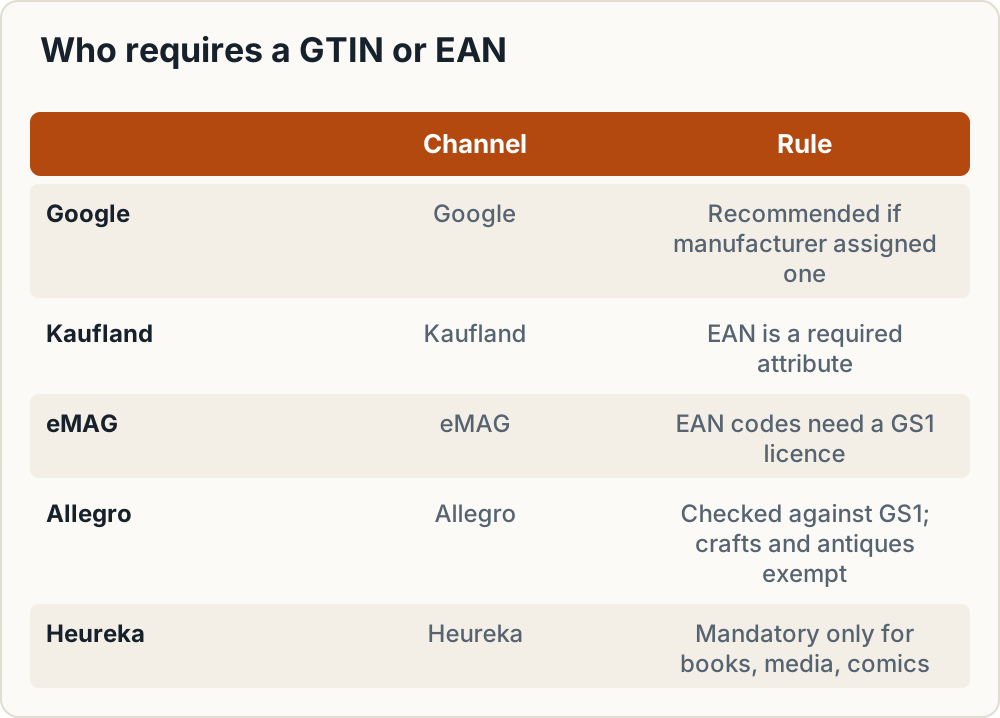
**Marketplaces.** The rules are tighter:
- **Kaufland** lists EAN as a [required attribute](https://sellerapi.kaufland.com/?page=product-data) in its product data.
- **eMAG** states that [all EAN codes entered on the platform must have a GS1 licence](https://marketplace.emag.bg/infocenter/emag-academy/how-to-add-a-product-one-by-one/how-to-add-the-ean-code-to-you-product-on-the-emag-marketplace-platform/how-to-get-ean-codes-for-your-products/?lang=en).
- **Allegro** [checks GTINs against the GS1 database](https://help.allegro.com/en/sell/a/what-is-a-gtin-ean-code-and-why-it-is-important-for-selling-on-allegro-8dg9Mz0WkuO). Handmade goods, unique crafts, certain collectibles and antiques can still be listed without one.
- **Heureka** requires an EAN [only for books, textbooks, maps and guides, films, music and comics](https://sluzby.heureka.cz/napoveda/xml-feed/).
So can you sell on Google Shopping without a GTIN? Yes, if the product truly has none and your feed says so correctly.
## What the Google warning actually means
The message "Limited performance due to missing value: GTIN [gtin]" appears when [Google suspects a product sits in a category that should have a GTIN](https://support.google.com/merchants/answer/14908685?hl=en). It is a warning, not a disapproval. The product still shows, but with reduced visibility.
To fix it, open **Products > Needs attention** and filter for the issue. Then either edit each product, or download the list as CSV, correct it and re-upload. Every GTIN you submit must be the one the manufacturer allocated.
Typing in an invented code to clear the warning tends to swap it for a different issue:
| Issue | Cause | Fix |
|---|---|---|
| Incorrect GTIN | The code is valid but [belongs to another product](https://support.google.com/merchants/answer/12468182?hl=en), often reused by accident | Use the manufacturer's GTIN, then request review |
| Restricted GTIN | Restricted-circulation prefixes [02, 04 or 2](https://support.google.com/merchants/answer/6324461?hl=en) | Use a real GS1-allocated number, or leave the field empty |
| Unsupported GTIN | A [coupon-only number starting with 981, 982, 983, 984, 99 or 05](https://support.google.com/merchants/answer/6286302?hl=en) | Submit the globally valid GTIN, or leave the field empty if there is none |
| Invalid value [gtin] | The value is [not a valid 8, 12, 13 or 14-digit GTIN](https://support.google.com/merchants/answer/12468409?hl=en) | Correct the number or remove it |
Google says reviews take 24 to 48 hours and that corrected data shows within 24 to 72 hours.
## Decision table: which fields to fill for which product type
| Case | GTIN | Brand / MPN | identifier_exists | Google | Allegro / Kaufland / eMAG | Recommended action |
|---|---|---|---|---|---|---|
| (a) Branded product you resell | Manufacturer's GTIN, exactly as printed | Manufacturer's brand and MPN | Leave unset | Expects the GTIN | Use the manufacturer's code. Allegro bars you from adding your own GTINs to brands you do not own | Copy the barcode from the packaging or supplier data |
| (b) Your own brand, contract-made | Allocated by you from a GS1 account | Your brand, your item code | Leave unset | Brand and MPN accepted | Needs a GS1 GTIN | Buy GS1 numbers before listing on marketplaces |
| (c) Handmade or one-off | Empty | Maker or shop name, your item code | `no` only if brand and MPN are also missing | Exempt (custom-made) | Allegro allows it. Not documented publicly for Kaufland or eMAG | Fill brand and MPN |
| (d) White-label from a supplier, no barcode | Empty until you buy GS1 codes | Your brand, your item code | Leave unset | Accepted as a store brand | Needs a GS1 GTIN | Treat as case (b). You are the brand owner |
| (e) Used item with its original barcode | Original GTIN | Original brand / MPN | Leave unset | Expects the GTIN | Same as (a) | Use the printed code |
| (e2) Vintage or antique | Empty | Brand if known | `no` if nothing exists | Exempt | Allegro allows antiques | Describe it well in title and attributes |
| (f) Bundle or kit you assemble | Depends on how you sell it | Your brand if sold as your product | Check Google's bundle documentation | Google treats merchant-defined bundles separately | Check each marketplace's category rules | For marketplaces, the safest route is to treat it as an own-brand product (b) |
A reseller (case a) must use [manufacturer-assigned identifiers, never internal SKUs](https://support.google.com/merchants/answer/160161?hl=en). In cases (b) and (d) you are the brand owner, so the GTIN has to come from your own GS1 membership. No supplier or code reseller can provide it.
## How to set identifier_exists to no (and when not to)
[identifier_exists is a recommended attribute, not a required one](https://support.google.com/merchants/answer/6324478?hl=en). Set it to `no` (or `false`) only when the product has no GTIN, no MPN and no brand. Google's examples are custom or one-of-a-kind goods, vintage and antique items, and books published before 1970. In XML:
```xml
no
```
A valid GTIN looks like this:
```xml
3234567890126
```
Accepted lengths are 8, 12, 13 or 14 digits. Google ignores spaces and dashes.
> **Important:** Setting identifier_exists to `no` on a product that does have an identifier triggers a warning when Google [finds evidence that one exists](https://support.google.com/merchants/answer/6324478?hl=en). For own-brand items, fill in brand and MPN rather than using the `no` flag.
Do not put SKUs or made-up numbers in the GTIN field. Do not give the same GTIN to several variants in one market either. Google tells merchants [not to guess, invent or duplicate values](https://support.google.com/merchants/answer/6324461?hl=en).
### Checking the check digit by hand
The last digit of a GTIN-13 is a checksum. Take the first 12 digits of 3234567890126 and multiply them alternately by 1 and 3, starting with 1:
3·1 + 2·3 + 3·1 + 4·3 + 5·1 + 6·3 + 7·1 + 8·3 + 9·1 + 0·3 + 1·1 + 2·3 = 94
Round 94 up to the next multiple of 10, which is 100. The check digit is 100 − 94 = 6, which matches. A spreadsheet formula built on this rule catches most typing errors before upload. It cannot tell you whether a code belongs to your product.
## Setting it up in Shoptet, WooCommerce and Shopify
### Shoptet
The EAN is a standard product field. Shoptet's [Google Nákupy help article](https://podpora.shoptet.cz/hc/cs/articles/360003140992-Google-N%C3%A1kupy) says brand and EAN (GTIN) are fields merchants often forget, and that wrong or incomplete data can get products blocked. The feed URL is under **Propojení > XML feedy**, in the Google nákupy row.
That help page does not describe an identifier_exists setting. For handmade items, leave the EAN empty and fill in the brand. If you need identifier_exists, add it with a feed rule in Merchant Center. Test this on one product first.
### WooCommerce
Since WooCommerce 9.2, the Inventory tab has a [built-in GTIN/UPC/EAN/ISBN field](https://woocommerce.com/document/gtin/), which the documentation calls the global unique ID field. Google for WooCommerce 2.9.0 and later syncs it to Merchant Center and can migrate values stored in older custom fields. If you use a third-party feed plugin, check that it maps this field to `gtin`. See our comparison of [feed tools for WooCommerce, Shoptet and Shopify](/product-feed-tool-woocommerce-shoptet-shopify).
### Shopify
Each variant has a [Barcodes field (EAN, GTIN, ISBN, UPC)](https://help.shopify.com/en/manual/products/add-update-products). Merchants in the Shopify Community report that the Google & YouTube app does not always pass identifier_exists the way they expect. This is community-reported, not an official Shopify statement.
The common workaround is a Merchant Center rule that sets identifier_exists to `no` for a defined product group. Check one item in Merchant Center before applying any rule to the whole catalogue. Platform differences are covered in [Shoptet vs Shopify vs WooCommerce](/shoptet-shopify-woocommerce-cee-comparison).
## Own-brand products: do you have to buy GS1 barcodes?
Google does not require it, because brand plus MPN is accepted for store brands. Marketplaces effectively do:
- Kaufland makes EAN a required attribute.
- eMAG requires GS1-licensed codes.
- Allegro calls GS1 the only official source of GTINs. It says owners of unbranded products can assign their own GTIN, with the seller responsible for GS1 registration and fees.
GS1 describes itself as [the only official provider of GTINs and EAN/UPC barcodes](https://gs1.eu/get-a-barcode/). Numbers from your national office are valid worldwide, so a code from GS1 Czech Republic also works on Polish Allegro or Romanian eMAG.
Rule of thumb:
- Google only, with a handful of SKUs: brand plus MPN is enough.
- Any marketplace or brick-and-mortar retail plans: buy from GS1.
## Which GS1 organisation to approach, and what it costs
GS1 tells sellers to contact the member organisation in their own country.
| Country | Organisation | Prefix | Published entry pricing |
|---|---|---|---|
| CZ | [GS1 Czech Republic](https://www.gs1cz.org), helpdesk 227 031 261 | 859 | [From 1 Jan 2026, excl. VAT](https://www.gs1cz.org/cenik): GCP-11 (10 numbers) 1,500 CZK entry; GCP-9 (1,000 numbers) 5,000 CZK entry plus an annual operating fee by revenue category (1,040–165,750 CZK across categories) |
| SK | [GS1 Slovakia](https://www.gs1sk.org), info@gs1sk.org | — | Online registration, codes generated in EANonline. Fees are in the "Cenník poplatkov" (not verified by us) |
| PL | GS1 Polska | 590 | [136 PLN gross for 10 codes, as quoted by Fakturownia](https://fakturownia.pl/kody-ean-wszystko-co-musisz-wiedziec). Third-party figure; confirm on gs1.pl |
| HU | [GS1 Magyarország](https://gs1hu.org) | — | "Díjjegyzék 2026" fee schedule and fee calculator on the site (not verified by us) |
| RO | [GS1 Romania](https://www.gs1.ro/obtine-coduri-de-bare-gs1) | 594 | GTIN Individual 9 EUR per code, one-time, no renewal. Annual licence from 120 EUR/year (100-GTIN tier), varies by company category. VAT status not stated |
In CZ, new members also take an introductory GS1 training. The 10-number GCP-11 block can only be assigned when a company first registers.
### Worked example: 10 own-brand SKUs
Take a shop with 10 own-brand products, each sold in one variant.
- **Czech company:** a GCP-11 block of 10 numbers has a 1,500 CZK entry fee, excluding VAT. The 2026 price list shows no annual operating fee for this block, unlike the larger blocks. Confirm with the helpdesk before budgeting.
- **Romanian company:** 10 × 9 EUR = 90 EUR, one-time, through the single-code route. eMAG and GS1 Romania [launched this in June 2022](https://about.emag.ro/2022/06/10/codurile-unice-ean-pot-fi-achizitionate-de-comerciantii-emag-marketplace-chiar-si-pentru-un-singur-produs/) via coduri.gs1.ro. Before that, only an annual licence was available.
The two products differ: one is a 10-number block, the other is individual codes. Compare them only for this 10-SKU case. If the Romanian shop grows, the annual licence starts at 120 EUR/year for up to 100 GTINs. At 9 EUR per code, single codes pass 120 EUR at the 14th code. After that the licence bills every year, while single codes do not.
### Getting your codes
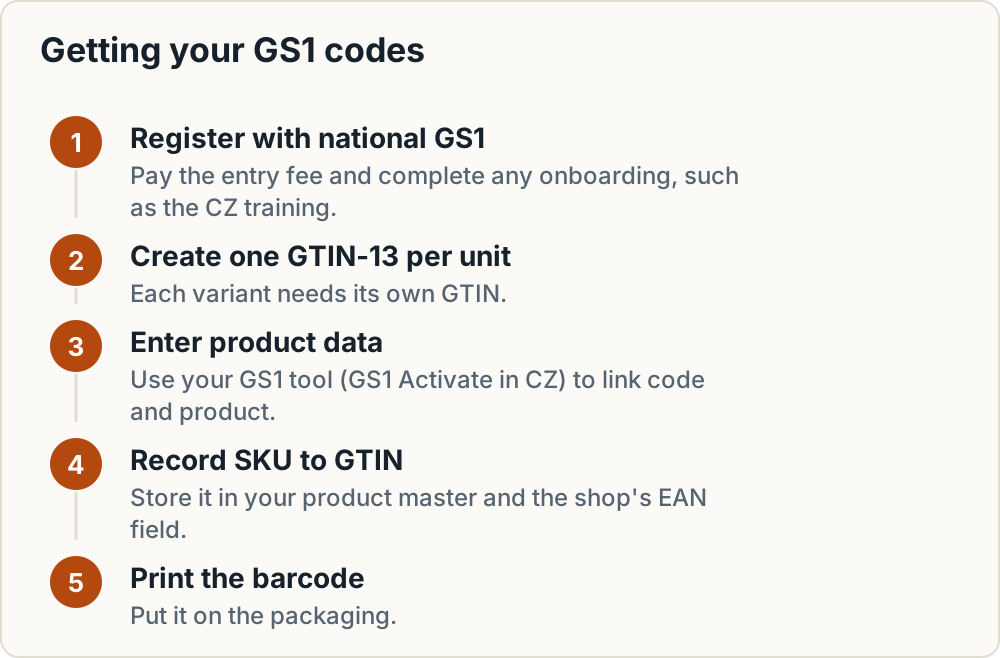
1. Register with your national GS1 organisation and pay the entry fee.
2. Complete any onboarding, such as the introductory training in CZ.
3. Create one GTIN-13 per sellable unit. Allegro requires [a separate GTIN for each variant](https://help.allegro.com/en/sell/a/what-is-a-gtin-ean-code-and-why-it-is-important-for-selling-on-allegro-8dg9Mz0WkuO), such as a different colour, scent or capacity.
4. Enter the product data in your GS1 organisation's tool (GS1 Activate in CZ) so the code is linked to your product.
5. Record SKU → GTIN in your product master and in the shop's EAN/barcode field.
6. Print the barcode on the packaging.
## Are EAN codes from resellers allowed?
GS1's general position, stated in a [GS1 Australia FAQ](https://www.gs1au.org/resources/faqs/barcode-standards), is that buying from a reseller is at your own risk. Once a number is resold, GS1 no longer manages it and cannot guarantee it stays unique. The FAQ is not from the EU, but CEE marketplaces take the same line. eMAG requires GS1-licensed codes. Allegro tells sellers not to obtain GTINs outside GS1, because such numbers may belong to other products, and says it may terminate such offers.
> **Warning:** A resold code can pass a check-digit test and still be registered to another company. That can fail marketplace checks or show up as "Incorrect GTIN" in Merchant Center.
There is one legitimate case of using a code you did not create: reselling a branded product under its manufacturer's real GTIN.
## What marketplaces demand for own-brand items
| Channel | GTIN for own brand | No-GTIN route |
|---|---|---|
| Google | Not required; brand + MPN | Yes, for store brands and custom goods |
| Allegro | GTIN from GS1, unique per variant, checked against GS1 | Handmade, unique crafts, certain collectibles, antiques |
| Kaufland | EAN is a required attribute | None found in the public docs |
| eMAG | EAN codes must have a GS1 licence | Not documented in the public pages |
| Heureka | EAN-13, mandatory only for books, media and comics | Yes, in all other categories |
For the other comparison sites, see [Heureka, Zboží.cz, Árukereső and Compari feed requirements](/heureka-zbozi-arukereso-compari-feed-requirements). Related guides: [GPSR fields on Allegro, Kaufland and eMAG](/gpsr-fields-allegro-kaufland-emag), [selling on Allegro from another EU country](/sell-on-allegro-from-eu-country) and [Kaufland Marketplace fees in CZ, SK and PL](/kaufland-marketplace-czech-slovakia-poland-fees).
## Handmade products: what goes into the GTIN field
Nothing. Do not enter a SKU, an invented 13-digit number or a code taken from a similar item. Instead:
1. Set brand to your maker or shop name.
2. Set MPN to your own item code.
3. Write an accurate title and fill in material, colour and size.
4. Set identifier_exists to `no` only if brand and MPN are also missing.
5. On Allegro, list the offer without filling in the GTIN field and complete the other parameters.
If the same design moves into series production and you list it on Kaufland or eMAG, buy GTINs at that point.
## Common mistakes
- Copying the SKU into the GTIN field to make the warning go away.
- Giving one GTIN to every size or colour of a product.
- Setting identifier_exists to `no` across the whole catalogue, including branded resale items.
- Buying codes from a reseller to save on the GS1 entry fee.
- Assigning your own codes to another company's branded products.
- Leaving brand empty on own-brand items. Shoptet names it as one of the fields merchants often forget.
## Frequently asked questions
### Does every variant need its own GTIN?
Yes. Each colour, size or pack size is a separate trade item and needs its own GTIN. Allegro requires this explicitly, and Google tells merchants not to duplicate one GTIN across variants in the same market.
### Can I use the same GTIN on Google and on marketplaces?
Yes. A GTIN identifies the product, not the sales channel. The same code goes into your Google feed, Allegro, Kaufland, eMAG and Heureka. Keeping one SKU-to-GTIN sheet makes sure every channel gets the same value.
### Will Heureka reject my product if it has no EAN?
The EAN is mandatory only for books, textbooks, maps and guides, films, music and comics. In all other categories it is optional in the Heureka XML feed. Where you do submit one, it must be EAN-13.
### How long does a GTIN fix take to show in Merchant Center?
Google states that corrected product data appears within 24 to 72 hours. Reviews requested after fixing an Incorrect GTIN issue take about 24 to 48 hours. Batch your fixes and request review once rather than product by product.
## Pre-upload checklist
Copy this into your feed QA sheet:
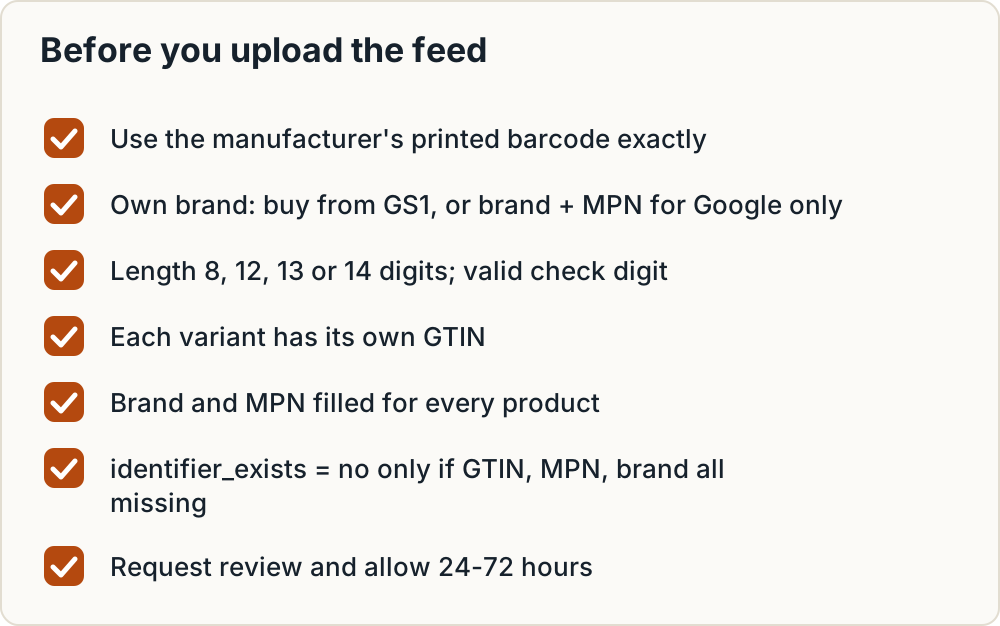
1. Does the manufacturer print a barcode? Use it exactly as printed.
2. No barcode and it is your brand? Buy from GS1, or submit brand + MPN for Google only.
3. Check the length is 8, 12, 13 or 14 digits and the check digit is valid. The code must not start with 02, 04 or 2 (restricted) or 05, 98 or 99 (coupons).
4. Each variant has its own GTIN, with no duplicates across variants.
5. Brand and MPN are filled for every product.
6. identifier_exists = `no` only where GTIN, MPN and brand are all missing.
7. Re-submit, request review and allow 24–72 hours.
8. Keep one sheet mapping SKU → GTIN → GS1 record.
Next, check the wider feed with our [product feed checklist for CEE channels](/product-feed-online-shop-cee-checklist), set up [mapping one feed to Google, Heureka and Allegro](/product-feed-mapping-google-heureka-allegro), and review the other product-page obligations in the [EU compliance checklist for an online shop](/eu-compliance-checklist-online-shop).