
On this page
This guide explains how the rules work in practice. It is not legal or tax advice; check the linked official sources or ask an adviser for your specific case.
A working WooCommerce Czech Republic setup needs five layers on top of core WooCommerce: Packeta for delivery, a local payment gateway (Comgate or GoPay), a Heureka product feed, Czech-style invoicing with IČO/DIČ fields, and legal pages that meet Czech and Slovak consumer law. Packeta and GoPay publish free plugins. One free bundle plugin, WPify Woo, covers most of the remaining gaps. Below is the order to launch in, with the settings that most often break.
This guide assumes you already run WooCommerce and want to sell to Czechia (CZK) and Slovakia (EUR). Where the two countries differ, we say so.
What a Czech/Slovak WooCommerce shop needs before launch
Core WooCommerce has no Czech or Slovak invoicing, no IČO/DIČ (company ID and VAT ID) fields at checkout, no Heureka feed and no pickup-point shipping. You need plugins for all of these. The principle we recommend is simple. Where a provider has an official free plugin, use it. Add a Czech bundle plugin only for what is still missing. Pay for an add-on only when it saves real manual work.
| Layer | Free / official option | Paid option worth considering when |
|---|---|---|
| Shipping | Packeta official plugin | You also ship with DPD, GLS or Czech Post (WPify premium add-ons) |
| Payments | GoPay plugin, Comgate module | You want one vendor to support all your gateways (WPify Gopay/Comgate/ThePay add-ons) |
| Product feed | WPify Woo (Heureka module) | Very large catalogue or several comparison sites |
| Checkout fields, QR payment | WPify Woo | — |
| Invoicing | — | An invoicing service such as Fakturoid plus a connector (WPify or Toret) |
| Legal pages | Written by hand or by a lawyer; withdrawal button module in WPify Woo | Legal review of your terms |
Cross-border VAT is a separate decision from the plugins. If you sell to consumers in both countries from one of them, or from elsewhere in the EU, read our guide to OSS VAT registration for a webshop before you set up tax classes in WooCommerce.
Packeta (Zásilkovna) plugin setup
Packeta, called Zásilkovna in Czechia, is the default delivery choice for many Czech and Slovak shoppers. Packeta describes its WooCommerce integration as official, completely free and open source. Its setup guide is in Packeta's documentation portal.
According to the plugin page on WordPress.org, the current version is 2.3.2. It needs WordPress 6.3 or newer and PHP 7.4 or newer. It supports HPOS (High-Performance Order Storage, with WooCommerce 7.9.0 and later) and the block-based checkout, so you don't have to fall back to the classic shortcode checkout.
What the plugin does:
- Shows a pickup point selection widget at checkout
- Validates delivery addresses for CZ and SK
- Submits orders to Packeta automatically, and lets you edit weight and dimensions before submission
- Prints labels from the WordPress admin
- Tracks shipments and updates order status automatically
- Supports 18+ age verification per product
Setup steps
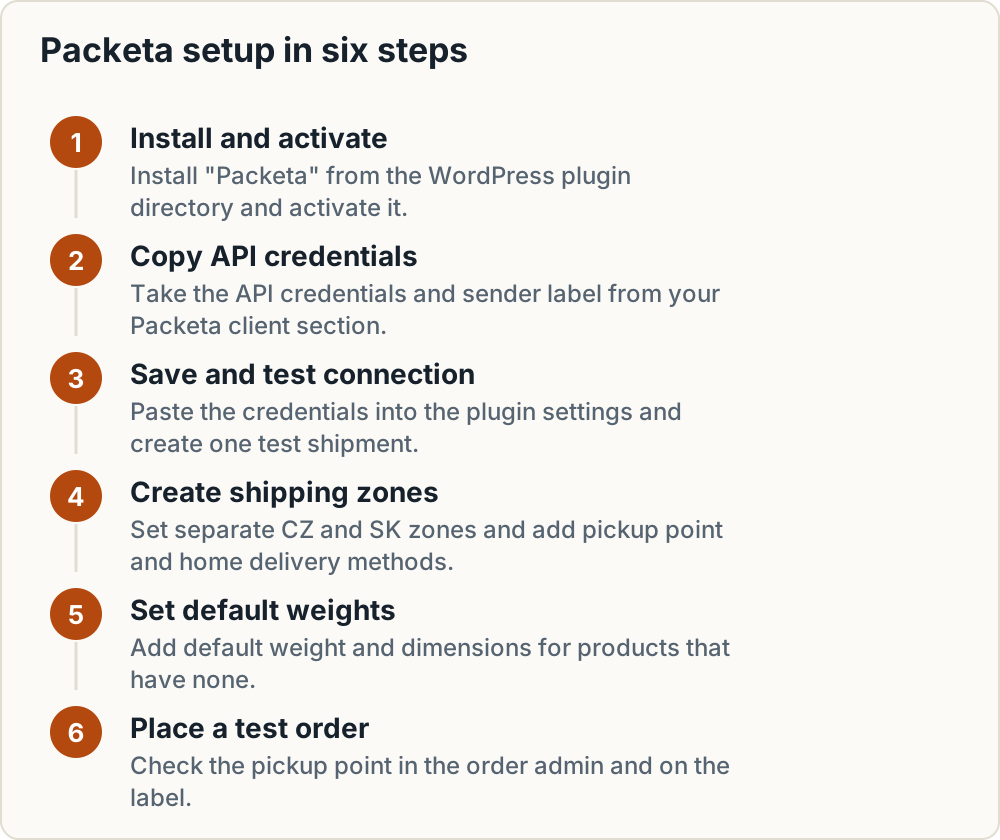
- Install "Packeta" from the WordPress plugin directory and activate it.
- Log in to your Packeta client section and copy your API credentials and sender label. Use the field names given in Packeta's docs portal. They are not the same as your login details.
- Paste the credentials into the plugin settings and save. Then check the connection by creating one test shipment.
- Go to WooCommerce shipping zones. Create separate zones for Czechia and Slovakia and add the Packeta methods you want (pickup point, home delivery) to each zone.
- Set default weight and dimensions for products that have none. Missing weights are a common reason for rejected shipments or wrong rates.
- Place a test order with a pickup point and check that the selected point appears in the order admin and on the label.
Common problems: the widget doesn't load because a page builder or optimisation plugin delays or combines JavaScript, and shipping zones are ordered so that a generic "Everywhere" zone catches CZ/SK orders before your Packeta zone does.
If you offer cash on delivery through Packeta, set it up as a separate payment method tied to Packeta shipping. Our guide to cash on delivery fees and refusal risk explains the costs. For plugin issues, Packeta's e-commerce support is at e-commerce.support@packeta.com.
Payment gateways: Comgate vs GoPay
Comgate and GoPay are two widely used Czech payment gateways, and both work with WooCommerce. Which one suits you depends mostly on your volume and on how much you rely on the plugin.
GoPay
The GoPay for WooCommerce plugin is at version 1.0.36. It needs WordPress 5.8+ and PHP 8.1+, and it has supported block checkout since 1.0.22. The plugin lists 56 payment methods and 9 currencies. That matters if one shop charges CZK to Czech buyers and EUR to Slovak buyers.
The GoPay installation guide lists the credentials you need: GoID, Client ID and Client Secret, with separate sets for the sandbox and for production. The plugin has a test mode toggle, and you choose which payment methods and banks to show from those enabled on your GoPay account.
The plugin is rated 2.6/5 on WordPress.org. Some reviews describe problems with digital and downloadable products, though the changelog lists related fixes in versions 1.0.15 and 1.0.29. Install it on a staging copy first and run every payment scenario there before going live.
Comgate
Comgate also offers a WooCommerce module. You connect it with credentials from your Comgate account and switch between test and live mode. Before you install, check the current version and supported features, including Apple Pay and Google Pay, in Comgate's own documentation. We could not confirm the current version from a primary source.
Fees: reported figures, check current price lists
We could not confirm either provider's fees from a primary source. Treat the figures below as reported and possibly outdated, and confirm them against each provider's current price list before you sign:
| Comgate (reported) | GoPay (reported) | |
|---|---|---|
| Card rates | 0.79% to 0.99% depending on monthly volume; also a flat 0.98% tariff for all cards (CC.cz) | New merchants: 0% up to CZK 50,000 per month (without cards), then 1.7% + CZK 3; mid-size from 1.2% + CZK 1.5; large from 1% + CZK 1 (Banky.cz) |
| Chargeback | Check price list | CZK 990 reported |
Look past the headline percentage. Compare any monthly fee, the fixed fee per transaction, how often payouts arrive, and whether foreign or business cards cost more.
Gateway setup checklist
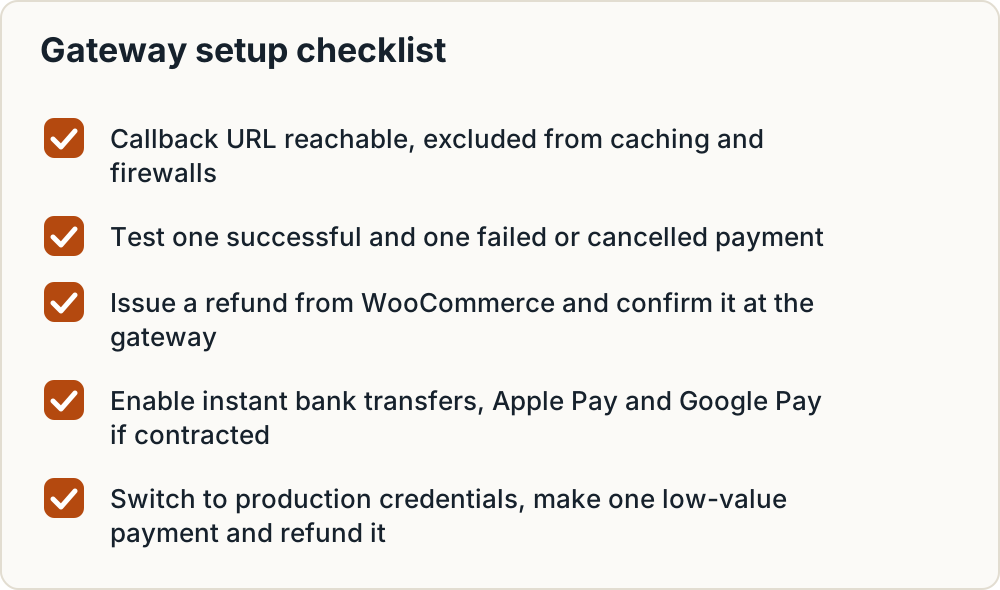
- Make sure the notification (callback) URL can be reached from outside. Exclude it from page caching, and allow it in security or firewall plugins such as Wordfence or Cloudflare rules. A blocked callback leaves paid orders stuck in "Pending payment".
- Run a successful test payment and a failed or cancelled one. Check the order status and the customer email for both.
- Issue a refund from the WooCommerce order screen and check that it reaches the gateway.
- Enable instant bank transfers and, if your contract includes them, Apple Pay and Google Pay.
- Switch from sandbox to production credentials, then make one real low-value payment and refund it.
If you prefer one vendor for all your Czech plugins, WPify sells premium Gopay, Comgate and ThePay add-ons for its WPify Woo bundle. For which methods Czech and Slovak shoppers expect, see payment methods to offer in Poland, Czechia and CEE.
Heureka feed and Ověřeno zákazníky
Heureka is the leading price comparison site in Czechia and Slovakia, so most shops there want a Heureka product feed. The free core of WPify Woo (version 5.4.22, WordPress 6.2+, PHP 8.1+) generates one. According to the WPify Woo plugin page, the Heureka module:
- outputs a valid XML feed
- maps your WooCommerce categories to Heureka categories
- includes delivery methods and prices
- gives you a cron URL so the feed regenerates on a schedule
- builds the feed in chunks, so large catalogues don't time out
The same module sends orders to Heureka's Ověřeno zákazníky (Verified by Customers) programme, which asks buyers for a review. It can add an optional opt-out checkbox at checkout and show the Heureka widget. WPify Woo also adds Zboží.cz and Sklik conversion and retargeting tracking if you advertise on Seznam.
Where feeds usually fail
- Category mapping: unmapped products land in the wrong category or get rejected. Map at category level first, then fix exceptions.
- Product identifiers: missing EANs weaken product matching. Fill the EAN field for every product that has one.
- Delivery date: a vague or wrong delivery time hurts your listing. Base it on real dispatch times.
- Stock status: out-of-stock products shown as available lead to cancelled orders and bad reviews.
- Cron: a feed that never regenerates serves stale prices. Call the cron URL from a real server cron job, not only WP-Cron.
We list the exact required and recommended fields in our guide to Heureka, Zboží.cz, Árukereső and Compari feed requirements.
Invoicing and Czech/Slovak checkout fields
Czech and Slovak business buyers expect to enter their company ID (IČO) and VAT ID (DIČ, or IČ DPH in Slovakia) at checkout and get them on the invoice. WPify Woo adds these fields. It validates IČO against ARES, the Czech business register, and VAT numbers against the EU's VIES system, and can autofill company details.
For orders paid by bank transfer, WPify Woo can show a QR payment code (Czech, Slovak, Hungarian and EU/SEPA formats). Customers can then pay from their banking app without retyping the account number and variable symbol, which cuts down on unmatched payments.
Fakturoid
Fakturoid is a widely used Czech invoicing service. Its own help page names WPify and Toret as WooCommerce connector providers. The connectors can create proforma invoices and invoices, match payments, and issue correction documents (credit notes) for returns.
Two settings break most new installations:
- Bank account: set it in Fakturoid's Settings, or invoices and proformas won't carry payment details.
- VAT payer status: it must match in Fakturoid and in WooCommerce. If one treats you as a VAT payer and the other doesn't, prices and invoice totals won't agree.
Any other accounting system with a WooCommerce connector can work. Before you commit, check that it issues invoices in the order currency (CZK or EUR) and in the right VAT mode for the customer's country. If you charge Slovak consumers Slovak VAT under OSS, the invoice has to show it. See OSS VAT registration for a webshop.
Legal pages and mandatory information
Your legal set should include:
- terms and conditions (obchodní podmínky / obchodné podmienky)
- a privacy policy covering GDPR
- cookie information and consent
- a complaints and returns page
- contact details showing your company name, registered address and company ID
Withdrawal rights: Czechia vs Slovakia
Both countries apply the EU 14-day right of withdrawal, starting when the consumer receives the goods.
| Czechia | Slovakia | |
|---|---|---|
| Withdrawal period | 14 days from receipt of goods | 14 days from receipt of goods |
| Refund | Within 14 days of withdrawal, including delivery costs; the seller may hold the refund until the goods are returned or proof of dispatch is shown (Arrows) | Price plus delivery costs, but only up to the cheapest delivery option offered; the consumer pays return shipping (Podnikajte.sk) |
| If the consumer was not properly informed | Period is extended | Extended to 12 months + 14 days |
The EU rule behind both laws limits refunded delivery costs to the cheapest standard option you offered. If a customer chose express delivery, you refund the cost of the cheapest standard option, not the express fee. In both countries the terms must explain the withdrawal conditions, say who pays for the return, and include a standard withdrawal form.
In Slovakia, making a return conditional on original packaging is unlawful; you may only recommend it. Podnikajte.sk reports fines of up to EUR 66,400 from the Slovak Trade Inspection for this kind of breach. Confirm the fine against the current Slovak law before relying on it.
Out-of-court dispute resolution (ADR)
Under section 14 of the Czech Consumer Protection Act, the seller must name the competent out-of-court (ADR) dispute body, with its web address, both on the website and in the terms. The Czech Trade Inspection Authority (ČOI) is the general ADR body. Lupa.cz reports fines of up to CZK 1 million for this. For Slovak customers, check which ADR body applies to your sector and name it in your terms.
Remove any link to the EU Online Dispute Resolution (ODR) platform. It was discontinued on 20 July 2025 under Regulation (EU) 2024/3228, and many template terms still contain the old link.
Product-side duties are covered elsewhere: see GPSR fields on marketplaces for product safety information and packaging EPR in CEE for packaging registration.
The EU withdrawal button: status in 2026
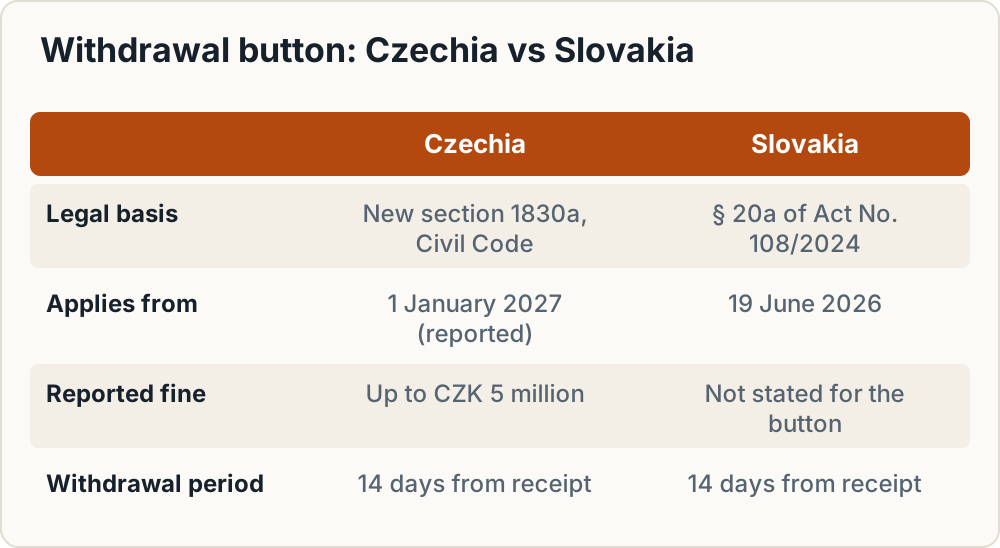
Directive (EU) 2023/2673 requires shops that sell online to offer a withdrawal function from 19 June 2026. The two countries are on different timelines:
- Slovakia: the duty is in § 20a of Act No. 108/2024 on consumer protection and has applied since 19 June 2026, according to Legalfirm.sk. If you sell to Slovak consumers, you need the button now.
- Czechia: the country missed the deadline. The amendment adding a new section 1830a to the Civil Code passed the Senate in August 2026 (Ekonomický deník), and Blesk reported that President Pavel signed it. Epravo.cz gives 1 January 2027 as the effective date and reports fines of up to CZK 5 million.
The required flow has two steps:
- The consumer clicks a clearly labelled button (for example "odstoupit od smlouvy" / "odstúpiť od zmluvy") and enters the details that identify them and the contract.
- The consumer confirms with a second button, such as "potvrdit odstoupení od smlouvy".
The trader must then confirm receipt without delay on a durable medium, in practice an email. The confirmation should include the content of the withdrawal and the date and time it was sent. The button must stay available for the whole withdrawal period.
WPify Woo includes a free withdrawal module that its authors describe as compliant with Directive 2023/2673. It uses a two-step submission, and guests can reach it through order links in emails. Turn it on before you take Slovak orders, and well before 1 January 2027 for Czech orders. Re-check both countries' rules when you launch, as implementing details can still change.
Launch test checklist
Run these on staging, then repeat the payment tests once in production:
- Pickup point order: select a Packeta point, pay by card, and check the point in the admin, on the label and in tracking.
- Address delivery: test a Czech and a Slovak address and confirm the validation accepts real addresses.
- Card payment: successful payment, order moves to Processing, confirmation email sent.
- Failed payment: the order stays unpaid, the customer can retry, and no invoice is issued.
- Refund: issue from WooCommerce, confirm it at the gateway, and check that a credit note is created in your invoicing system.
- Bank transfer: the QR code shows, the payment is matched, and the invoice follows.
- B2B order: IČO/DIČ are validated and printed on the invoice.
- Heureka feed: open the feed URL, check it is valid XML, check prices and stock against the shop, and confirm the cron runs.
- Language: thank-you page, emails and invoices appear in Czech or Slovak as appropriate, with no stray English strings.
- Legal: footer links to every legal page, the checkout terms checkbox works, the ADR body is named, no ODR link remains, and the withdrawal button sends a confirmation email.
Frequently asked questions
Do I need a Czech company to run a WooCommerce shop for Czech customers?
No. A company from another EU country, or from outside the EU, can sell to Czech and Slovak consumers. You still have to apply Czech or Slovak consumer law, charge the right VAT, and show your full company details on the site and invoices.
Is the Packeta WooCommerce plugin free?
Yes. Packeta describes it as official, free and open source. You pay only for the shipments under your Packeta contract.
Comgate or GoPay for a small WooCommerce shop?
Both work. Compare the current price lists at your expected monthly volume, including fixed per-transaction fees and any monthly fee. Then test each plugin on staging. Some GoPay reviews on WordPress.org mention problems with digital products, so shops selling downloads should test with special care.
How do I generate a Heureka XML feed in WooCommerce?
Install the free WPify Woo plugin, enable the Heureka module, map your categories, and schedule the cron URL from a server cron job. Then check the feed against Heureka's requirements.
Is the withdrawal button mandatory in 2026?
For Slovak consumers, yes: it has applied since 19 June 2026. For Czech consumers, the new law is reported to take effect on 1 January 2027. Adding the button now covers both.
Do I still need to link the EU ODR platform in my terms?
No. The platform closed on 20 July 2025, so remove the link. You still have to name the competent ADR body.
Which plugin issues Czech invoices from WooCommerce orders?
Core WooCommerce doesn't. Common choices are Fakturoid with a connector from WPify or Toret, or another accounting system with a WooCommerce connector that handles CZK, EUR and your VAT mode.
Can one WooCommerce shop sell in both CZK and EUR?
Core WooCommerce uses a single store currency, so you need a multi-currency plugin or separate CZ and SK shops. Check that your payment gateway, Packeta settings, invoicing connector and Heureka feed all handle the second currency.
Summary
- Install the free Packeta plugin, set product weights, and test pickup point and address orders for both countries.
- Choose Comgate or GoPay using current price lists, keep callback URLs out of caching and firewall rules, and test success, failure and refund.
- Use WPify Woo for the Heureka feed, Ověřeno zákazníky, IČO/DIČ validation and QR payments, and schedule feed regeneration with a real cron job.
- Connect invoicing (for example Fakturoid), with the bank account and VAT payer status matching in both systems.
- Publish terms with withdrawal rules for CZ and SK, a withdrawal form and the ADR body. Remove any ODR platform link.
- Add the withdrawal button now: it has been required for Slovak consumers since 19 June 2026, and Czech rules are reported to apply from 1 January 2027.
- Sort out OSS VAT before your first cross-border sale.
How we research and update guides is set out in our editorial policy.
Sources
What this guide relies on, in the order cited.
- WooCommerce integration · packeta.com
- plugin page on WordPress.org · wordpress.org
- GoPay for WooCommerce plugin · wordpress.org
- GoPay installation guide · help.gopay.com
- CC.cz · cc.cz
- Banky.cz · banky.cz
- WPify Woo · cs.wordpress.org
- WPify Woo plugin page · wordpress.org
- own help page · fakturoid.cz
- Arrows · arws.cz
- Podnikajte.sk · podnikajte.sk
- Lupa.cz reports · lupa.cz
- discontinued on 20 July 2025 · iubenda.com
- Legalfirm.sk · legalfirm.sk
- Ekonomický deník · ekonomickydenik.cz
- Blesk reported · blesk.cz
- Epravo.cz · epravo.cz