
On this page
- Why one master feed, and why Allegro breaks the simple version
- Master field mapping table: Google vs Heureka vs Allegro
- Category mapping with feed rules
- Fixing missing GTIN and other identifier errors
- Common errors: cause and rule-based fix
- What a master feed must carry for Allegro compliance fields
- Feed manager comparison: Mergado vs DataFeedWatch (dated October 2026)
- Decision table: which setup for which shop
- Pre-upload checklist
- Frequently asked questions
- Next steps
Yes, you can run Google Shopping, Heureka and Allegro from one product dataset. What you can't do is send all three the same file. Good multi-channel product feed mapping means one clean master record per product, plus rules that produce a separate output for each channel. Google and Heureka fetch a feed file from a URL. Allegro needs offers created through its API or an integrator.
This guide is for small shops with roughly 50 to 5,000 SKUs selling in Czechia, Slovakia and Poland. It covers the field-by-field differences, the errors behind most rejections, and a dated comparison of Mergado and DataFeedWatch.
Why one master feed, and why Allegro breaks the simple version
Google Merchant Center and Heureka work the same way. You publish a file at a URL, and the channel downloads it on a schedule. Heureka, for example, refreshes feeds every 2 hours for PPC shops and every 4 hours in free mode, according to its XML feed specification.
Allegro works differently. An offer is created by calling POST /sale/product-offers, either from your own code or through an integrator. Each offer attaches to a product in the Allegro catalog. The Allegro developer tutorial shows that a product already in the catalog needs only its GTIN (or Allegro product ID), a price and a stock quantity. A product that isn't in the catalog needs a full content set. So "the Allegro feed" is really a sync job that a tool runs against the API.
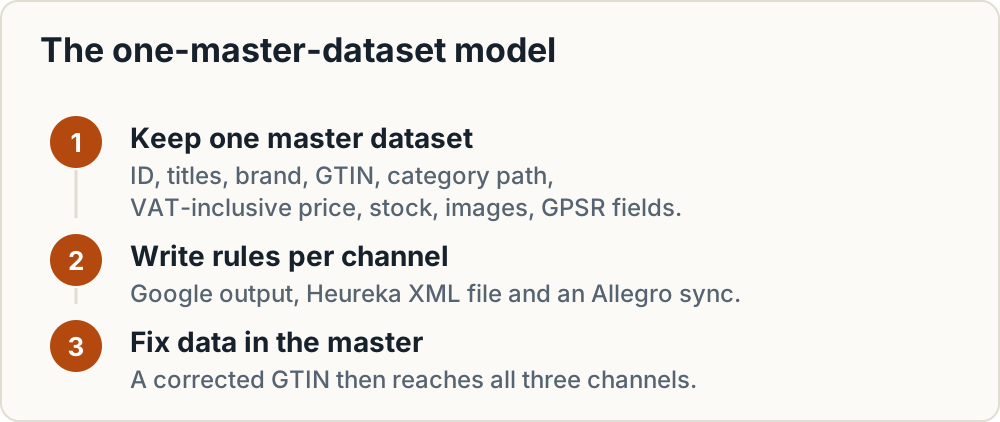
The model that works:
- Keep one master dataset: internal ID, full title, short title, brand, GTIN, your own category path, VAT-inclusive price, stock, images, and GPSR fields.
- Write rules that turn it into a Google output, a Heureka XML file and an Allegro sync.
- Fix data in the master, never in a channel. A GTIN corrected in the master then reaches all three channels.
For the wider channel landscape, see our product feed checklist for CEE channels. For Heureka's sister formats, see Heureka, Zboží.cz, Árukereső and Compari feed requirements.
Master field mapping table: Google vs Heureka vs Allegro
The limits below come from Google's product data specification, the Heureka XML specification and the Allegro offer tutorial.
| Master field | Google Merchant Center | Heureka XML | Allegro API |
|---|---|---|---|
| ID | id, max 50 chars |
ITEM_ID, max 36 chars, only _-0-9a-zA-Z (no diacritics) |
Allegro assigns the offer ID; your own ID goes in external.id |
| Title | title, max 150 chars |
PRODUCTNAME, max 200 chars, includes variant details such as colour or size |
name, 12–75 chars, at least 3 words; only needed if the product is not in the catalog |
| Description | description, max 5,000 chars |
Description element | Not part of the minimal one-request listing |
| URL | link |
URL, unique per variant, max 300 chars |
Not a landing page; the offer lives on Allegro |
| Image | image_link, at least 500×500 px from 31 Jan 2027 |
IMGURL, max 4096×4096 px, 30 KB to 2 MB, webp/jpeg/png/bmp, URL max 255 chars |
1–16 images for a new product |
| Price | price with ISO 4217 currency, VAT-inclusive outside US/Canada |
PRICE_VAT, final price incl. VAT in local currency |
sellingMode.price.amount plus currency |
| Availability | in_stock, out_of_stock, preorder, backorder |
DELIVERY_DATE: 0 = in stock, 1-3, 4-7, 8-14, 15-30, 31+ days, or a YYYY-MM-DD date |
stock.available, a number |
| Brand | brand, max 70 chars |
Manufacturer element | Product parameter |
| GTIN / EAN | gtin, up to 14 digits per value (UPC, EAN, JAN, ISBN, ITF-14) |
EAN, mandatory only for books, textbooks, maps, films, music, comics |
Key for catalog matching; a parameter for new products where the category requires it |
| Category | google_product_category (ID recommended) plus product_type up to 750 chars |
CATEGORYTEXT, full path in Heureka's tree |
Leaf category ID plus all required parameters |
On images, Google's specification asks for at least 500×500 px for all product images and says enforcement begins on 31 January 2027. If you are resizing a catalogue anyway, make images meet both Google's minimum and Heureka's maximums in one pass.
What the table means in practice
- IDs: generate IDs of 36 characters or fewer, using only letters, digits, hyphen and underscore. Those IDs then work on Heureka and fit inside Google's 50-character limit. Pick them once and keep them stable.
- Titles: a 150-character Google title won't pass Allegro's 75-character limit. Keep a separate
short_titlefield in the master, or a rule that builds brand + model + key attribute. - Prices: all three channels expect the VAT-inclusive price the buyer pays. If you sell in CZK, EUR and PLN, convert in the master (or with a currency rule) and round before you export.
- GTIN: one barcode serves all three channels. It is the field where one fix pays off three times.
- Category: there are three different taxonomies, so this field always needs mapping per channel.
Category mapping with feed rules
Keep your own category path in the master data and never overwrite it. Next to it, keep a mapping table with four columns: your category, Google category ID, Heureka CATEGORYTEXT path, and Allegro category ID. Each output rule looks up the channel value. When a channel changes its tree, you edit one row, not hundreds of products.
Heureka. An incomplete path or non-standard category names in CATEGORYTEXT cause problems. Mergado's help page on Heureka errors recommends its "Rename categories in bulk" rule to map your categories onto Heureka's official tree.
Allegro. Offers go into leaf categories, and a new product must carry every parameter its category requires. Required parameters differ by category, so don't hard-code them. Have your integrator or code fetch the current requirements for each category ID from the API before it builds the offer.
Google. Use the numeric google_product_category ID where you can. Put your own path into product_type, which accepts up to 750 characters and helps you split Shopping campaigns.
Practical order of work:
- Sort categories by revenue for the last 12 months.
- Map the top 20 percent of categories, which usually carry most of the sales, for all three channels.
- Hide unmapped categories from the Allegro output with a hide-product rule until they are done.
- Map the long tail in weekly batches.
The rule types worth learning are: rewrite (build a value from other fields), bulk category rename, hide product, and conditional set (for example, set DELIVERY_DATE to 0 when stock is above zero). Mergado and DataFeedWatch both build outputs this way, but their editors look different.
Fixing missing GTIN and other identifier errors
Google requires a GTIN for every product that has one. If a product has no GTIN, you must supply both MPN and brand. Set identifier_exists to no only for products that truly have no unique identifier, such as custom, handmade or vintage goods. Google's identifier_exists page warns that wrong use triggers a warning when Google finds evidence that an identifier exists.
Google's fix path for missing identifiers:
- Open Products > Needs attention in Merchant Center.
- Filter by the missing-identifier issue.
- Add an accurate GTIN, or both MPN and brand, either per product or by re-uploading a corrected file.
Where to find missing GTINs: supplier price lists and data exports, manufacturer data sheets, the barcode on the packaging, and GS1's lookup services. Never invent a barcode or reuse one from a similar product. Google's specification requires GTINs that are valid under GS1 rules, check digit included.
Heureka. EAN is mandatory only for books, textbooks, maps, films, music and comics. Elsewhere the specification makes it optional. Fill it anyway wherever you have a real barcode: the same value drives Allegro catalog matching and Google's identifier checks, so leaving it out of the Heureka output saves nothing.
Allegro. For a product already in the catalog, the offer needs only GTIN, price and stock. Without a catalog match, you must send a name of 12 to 75 characters with at least 3 words, a leaf category, all required parameters, and 1 to 16 images. Include the GTIN as a parameter where the category requires it. Per the Allegro tutorial, a 201 response means the offer was created synchronously. A 202 means it is still processing; check status through the operations endpoint, and allow up to two hours for a new product. A 422 means field values were rejected, for example when required parameters are missing.
Own-brand products with no barcode. To sell them as identified products, register GTINs through the GS1 member organisation in your country (GS1 Czech Republic, Slovakia or Poland). Fees vary by country and company size, so check the local GS1 price list.
Warning: Bulk-setting
identifier_existstonoto clear Merchant Center warnings is a costly shortcut. It hides the symptom on Google, leaves Allegro unable to match catalog products, and can bring new warnings when Google finds that the barcodes exist.
Common errors: cause and rule-based fix
Heureka rows come from the Heureka specification and Mergado's Heureka help page. Rows marked "integrator-reported" come from e-tailize's Allegro content rules, a third party. Confirm those against Allegro's own documentation.
| Channel | Symptom | Cause | Fix |
|---|---|---|---|
| Limited performance, missing identifiers | No GTIN, or no MPN + brand | Add GTIN from supplier data; set identifier_exists to no only for genuine custom items |
|
| Title truncated or flagged | Over 150 chars, or promo text | Rewrite rule: brand + product + key attribute; strip "SALE", "free shipping" | |
| Image disapproved | Promo overlays or watermarks | Use clean product images; keep overlays out of the main image | |
| Heureka | Name incomplete or rejected | PRODUCTNAME missing manufacturer or required details |
Rewrite rule: manufacturer + product name + size/colour |
| Heureka | Not paired, wrong category | Incomplete or non-standard CATEGORYTEXT |
Bulk-rename categories to Heureka's official tree |
| Heureka | Item missing | No or duplicate ITEM_ID |
Rule that generates the ID from a unique internal ID, max 36 allowed chars |
| Heureka | Item missing | Missing or badly formatted PRICE_VAT |
Numeric VAT-inclusive price, max 2 decimals, correct currency |
| Heureka | Variants merged or rejected | Same URL for several variants |
Append a fragment such as #ID to keep URLs unique |
| Heureka | Shipping missing | No DELIVERY block |
Shipping rates rule per carrier |
| Heureka | Availability unknown | Missing or invalid DELIVERY_DATE |
Conditional rule from stock; hide products with uncertain or long lead times |
| Heureka | Image rejected | Over 4096×4096 px or outside 30 KB–2 MB | Resize and compress |
| Heureka | Feed not processed | Not UTF-8, lowercase tags, over 500,000 items | Export UTF-8, uppercase tags, split large feeds |
| Allegro | 422 on create | Invalid values or missing required parameters | Fetch required parameters per category ID; or list by GTIN only if the product is in the catalog |
| Allegro | Name rejected | Under 12 or over 75 chars, fewer than 3 words | Short-title rule in the master |
| Allegro | Offer blocked (integrator-reported) | Missing responsible producer or safety info | Fill GPSR fields in master (next section) |
| Allegro | Images or price rejected (integrator-reported) | Non-HTTPS image URLs, price of zero | Serve images over HTTPS; hide zero-price items |
What a master feed must carry for Allegro compliance fields
Allegro's API takes the product's producer contact data in productSet[].responsibleProducer. You can pass it either by ID or by name, taken from the list returned by GET /sale/responsible-producers (Allegro developer note). For product sets, each product can carry its own responsible person in productSet[].responsiblePerson (Allegro GPSR developer note). When you update a set through PATCH, you must send the complete productSet array, existing data included.
Add these to the master dataset now, even if Google and Heureka ignore them:
- manufacturer name and postal/electronic address
- EU responsible person, where the manufacturer is outside the EU
- safety information and warnings text
- a reference to the producer record in your Allegro account
Without these fields, the Allegro output will break as soon as you scale up new offers. Field-level detail is in our guide to GPSR fields on Allegro, Kaufland and eMAG. Account setup for sellers based outside Poland is covered in how to sell on Allegro from another EU country.
Feed manager comparison: Mergado vs DataFeedWatch (dated October 2026)
Figures come from each vendor's official pricing page in October 2026 and exclude VAT.
| DataFeedWatch | Mergado | |
|---|---|---|
| Entry plan | Shop: $64/month, 1,000 SKUs, 3 feeds, 1 shop | Base prices tiered by products, integrations and outputs (see live page) |
| Next tier | Merchant: $84/month, 5,000 SKUs, 10 feeds, 2 shops | Higher product tiers |
| Larger | Agency: $239/month, 30,000 SKUs, 150 feeds, unlimited shops; Enterprise custom, 100,000 SKUs | Higher tiers |
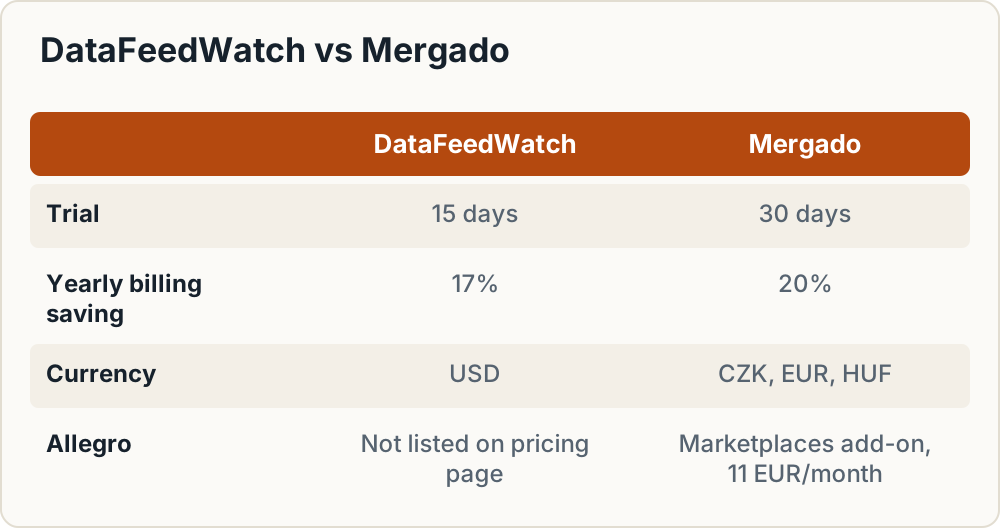
| Trial | 15 days | 30 days |
| Billing | Monthly or yearly; yearly is 17% cheaper | Monthly or yearly; yearly is 20% cheaper |
| Currency | USD on the pricing page | CZK, EUR, HUF |
| Support | Email only on Shop; email and chat on Merchant | VIP support available (see plan details) |
| Heureka / Allegro | Not listed on the pricing page; check the channel list | Allegro via Mergado Marketplaces add-on: 286 CZK or 11 EUR/month |
| Other add-ons (monthly) | — | Feed Image Editor 79 EUR, Translate 18 EUR, Bidding Fox 79 EUR, Scraping Camel 37 EUR |
Sources: DataFeedWatch pricing, Mergado pricing.
Mergado Marketplaces uploads products from your shop feed to Allegro and Kaufland. It syncs availability every 15 minutes, deactivates offers when a product sells out and reactivates them on restock (Mergado Marketplaces). Before you start the trial, check Mergado's help for the exact feed and account prerequisites.
Fit for CEE. Mergado is a Czech company, documents Heureka output in its help, and runs its own Allegro connector. DataFeedWatch is aimed at Google and international channels. Its pricing page does not mention Heureka or Allegro, so check its channel list for Heureka CZ/SK and Allegro support in the form you need before you buy.
Other tools to evaluate include Koongo and BaseLinker. For each, check what it does for Allegro (one-off import, or continuous stock and price updates) before you commit.
Decision table: which setup for which shop
| Shop profile | Recommended setup | Why |
|---|---|---|
| Under 300 SKUs, Google + Heureka only | Shop platform plugin or native export | Two pull feeds and few products; a feed tool adds cost but little control. See WooCommerce setup for Czech Republic and Slovakia |
| Under 1,000 SKUs, Google + Heureka, many title/category fixes | A feed manager entry plan | Rules fix data at scale without changing the shop database |
| Allegro as a main channel, any size | Integrator or API connection with stock sync | Allegro needs offers created and stock kept in sync, not a file URL |
| 1,000–5,000 SKUs | Plan sized above your SKU count, with headroom for variants | DataFeedWatch Shop stops at 1,000 SKUs; Merchant covers 5,000 |
| CZ/SK focus with Heureka + Allegro | Mergado with Marketplaces add-on, or a Polish-market integrator | Heureka output and Allegro sync from one place |
Worked example: 800 SKUs on Google, Heureka and Allegro
All amounts exclude VAT.
- DataFeedWatch Shop: $64 a month. 800 SKUs fit under the 1,000 limit, and 3 feeds cover three outputs. Allegro, though, takes offers, not a feed. Unless DataFeedWatch confirms an Allegro integration, you need a separate integrator for Allegro. On monthly billing the plan alone is $768 over 12 months. Yearly billing is 17% less.
- Mergado: base plan for your product and output tier (read it from the live pricing page) plus 11 EUR a month for Marketplaces, which is 132 EUR a year for the add-on. Yearly billing takes 20% off.
Watch the variant count. If each of your 800 products comes in sizes and colours, the SKU count a tool bills can be several times higher. Count exported rows, not parent products, before you pick a tier.
Tip: Use the trials (15 days at DataFeedWatch, 30 at Mergado) to run your real catalogue through Merchant Center diagnostics and one test Allegro offer. A tool that clears your actual errors during the trial is a better buy than one that only looks cheaper on paper.
Pre-upload checklist
Copy this into your tracker before the first full export.
- Every ID is unique, 36 chars or fewer, only
_-0-9a-zA-Z - Google titles 150 chars or fewer, Heureka 200 or fewer, Allegro short title 12–75 chars with at least 3 words
- No promo text in titles or images
- GTIN present where one exists; check digit validated; no reused codes
- Brand filled for every product; MPN where no GTIN exists
- Prices are VAT-inclusive, in the right currency, rounded
- Images at least 500×500 px (Google, from 31 Jan 2027), within Heureka's 4096×4096 px and 30 KB–2 MB, served over HTTPS, no watermarks
- Category mapped per channel from one mapping table; unmapped categories hidden from Allegro
-
DELIVERY_DATEset by a stock-based rule; long-lead items hidden - Variant URLs unique on Heureka
- GPSR fields filled: manufacturer, responsible person, safety info
- Heureka feed is UTF-8 with uppercase tags
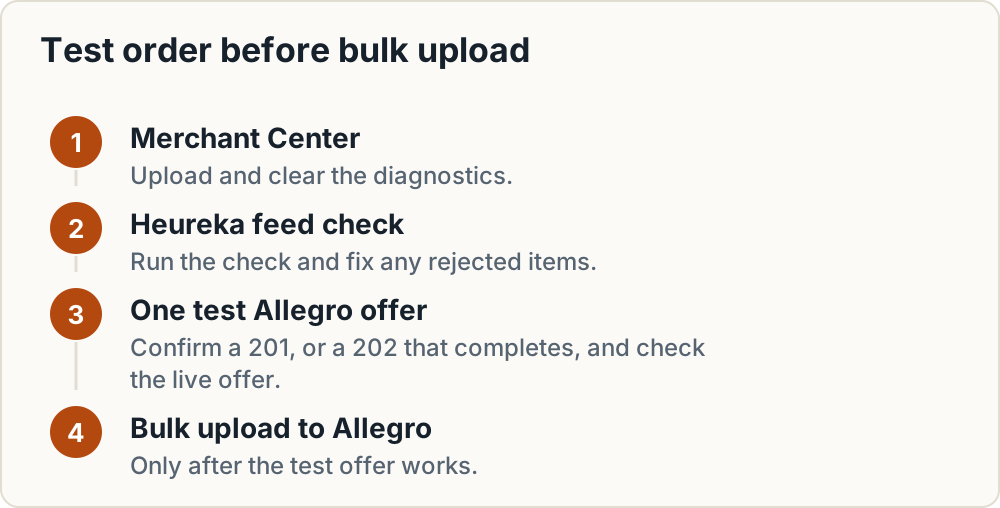
Test order:
- Upload to Merchant Center and clear the diagnostics.
- Run the Heureka feed check and fix any rejected items.
- Create one test Allegro offer through your tool or the API. Confirm a 201, or a 202 that completes, and check the live offer.
- Only then bulk-upload to Allegro.
Frequently asked questions
How often should product feeds refresh?
Heureka fetches feeds every 2 hours for PPC shops and every 4 hours in free mode, so regenerate your file at least that often. For Allegro, stock sync speed depends on the integrator; Mergado Marketplaces syncs availability every 15 minutes. Fast stock sync matters most on Allegro, where overselling leads to cancelled orders.
Why does Heureka not pair my products or show them in the right category?
The usual cause is an incomplete or non-standard CATEGORYTEXT that doesn't match Heureka's official category tree. Product names without the manufacturer or key variant details also cause trouble. Fix it with a bulk category-rename rule to Heureka's tree and a consistent manufacturer + model naming rule, and include real EANs where you have them.
Mergado or DataFeedWatch: which suits a small CZ, SK or PL shop?
For shops focused on Heureka and Allegro, Mergado fits more naturally: it is Czech, documents Heureka output, and offers Allegro sync as an 11 EUR monthly add-on. DataFeedWatch's $64 Shop plan suits Google-led shops under 1,000 SKUs, but confirm its Heureka and Allegro support first. Run both trials on your own catalogue before deciding.
Do I need GPSR data in the feed for Allegro?
Allegro's API has fields for the responsible producer and responsible person, and integrators report that new offers are blocked without them. Store manufacturer, responsible person and safety information in your master data so every Allegro offer carries them. Google and Heureka will simply ignore the extra fields.
Next steps
- Export your catalogue and count rows, including variants, to size your plan.
- Add
short_title, GTIN, brand and GPSR columns to the master data, and fill GTINs from supplier sources. - Build the category mapping table, top revenue categories first.
- Start a trial with a feed tool and work through the pre-upload checklist.
- Clear Google diagnostics, then Heureka, then publish one Allegro test offer before bulk upload.
- For channels beyond these three, see our overview of marketplaces in Central and Eastern Europe.
Sources
What this guide relies on, in the order cited.
- XML feed specification · sluzby.heureka.cz
- Allegro developer tutorial · developer.allegro.pl
- Google's product data specification · support.google.com
- Mergado's help page on Heureka errors · help.mergado.com
- identifier_exists page · support.google.com
- fix path for missing identifiers · support.google.com
- e-tailize's Allegro content rules · e-tailize.com
- Allegro developer note · developer.allegro.pl
- Allegro GPSR developer note · developer.allegro.pl
- DataFeedWatch pricing · datafeedwatch.com
- Mergado pricing · mergado.com
- Mergado Marketplaces · mergado.com