On this page
- Who this guide is for
- What a product feed is and which channels need one
- Step 1: Build one shared core data set
- Step 2: Check required fields by channel
- Step 3: Get identifiers right (GTIN, MPN, brand)
- Step 4: Write titles that work across channels
- Step 5: Map categories and delivery data
- Step 6: Set how often the feed updates
- Step 7: Choose platform export, plugin or feed tool
- Step 8: Run a weekly and monthly routine
- Common mistakes
- Where to go next
- Frequently asked questions
- Copyable data quality checklist
Short answer: build one clean master record per product and map it to each channel's tag names. The record holds a permanent ID, title, description, URL, image, VAT-inclusive price, availability, brand, GTIN or MPN, category and delivery data. Don't maintain five separate feeds by hand. A shop selling in Central and Eastern Europe only needs that one core data set. On top of it you add a few channel-specific rules: Heureka's category tree, Zboží.cz's mandatory delivery date and Google's GTIN rules.
This guide sets out the shared fields and shows where Google Merchant Center, Heureka, Zboží.cz, Árukereső/Compari and Allegro differ. It ends with a quality checklist you can copy into your own task list.
Who this guide is for
It's written for shops with roughly 50 to 5,000 SKUs on WooCommerce, Shoptet, PrestaShop or Shopify that sell, or plan to sell, in CZ, SK, PL, HU or RO. It applies if any of these is true:
- You want to appear in Google Shopping ads or free listings.
- You want to be listed on Heureka (CZ/SK), Zboží.cz (CZ), Árukereső (HU), Compari (RO) or Pazaruvaj (BG).
- You plan to list on Allegro or eMAG and need a structured product import.
- Your current feed has errors, and you don't know whether to fix the data or buy a feed tool.
If you only sell through one marketplace's own listing form, most of this applies later. Clean master data still makes that form faster to fill in.
What a product feed is and which channels need one
A product feed is a machine-readable file, usually XML and sometimes CSV, hosted at a stable HTTPS URL. Each channel fetches it on a schedule. The file has one item per sellable product or variant, so a T-shirt in three sizes is normally three items.
CEE channels split into two groups.
| Channel | Markets | Type | How the feed is used |
|---|---|---|---|
| Google Merchant Center | All | Ads and free listings | Fetched on a schedule or synced via a platform integration |
| Heureka | CZ, SK | Price comparison | XML feed fetched by Heureka |
| Zboží.cz (Seznam) | CZ | Price comparison | XML feed fetched by Zboží.cz/Sklik |
| Árukereső / Compari / Pazaruvaj | HU / RO / BG | Price comparison | XML feed fetched by the portal |
| Allegro | PL, CZ, SK | Marketplace | Feed is an import/sync source, usually through an integrator |
| eMAG | RO, BG, HU | Marketplace | Listing and sync tool, not a comparison feed |
Comparison engines and Google show your offer and send the click to your shop, so the feed is the listing. On marketplaces the feed only creates and updates offers inside the marketplace. Allegro.cz, for example, doesn't accept a direct XML feed. Shops list there through a Shoptet or Heureka v2 feed, or a one-time CSV/XML import, typically via BaseLinker (BaseLinker). For marketplace specifics, see our guides on selling on Allegro from another EU country and selling on eMAG as a foreign seller.
Step 1: Build one shared core data set
The principle is one master record, many outputs. Your shop database or a spreadsheet holds the master data. Each channel gets an export that renames the fields to its own tags.
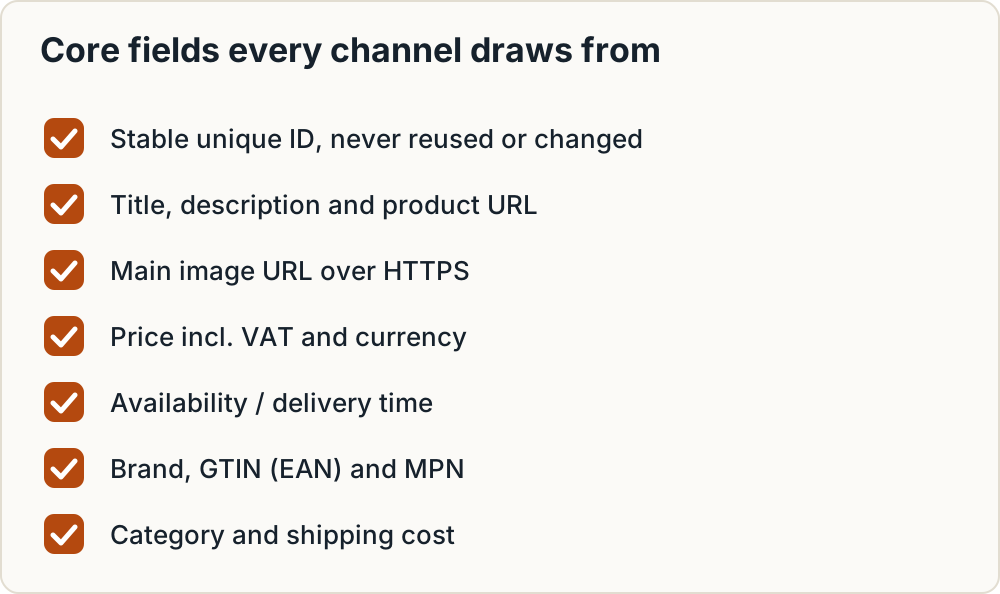
The core fields every channel draws from:
- Stable unique ID. Never reuse it and never change it.
- Title. Brand, product line, type and the attribute that tells variants apart.
- Description. Plain text that describes the product. No contact details, no advertising copy.
- Product URL. The page where the price and add-to-cart button are shown.
- Main image URL. A clean product photo over HTTPS.
- Price including VAT and the currency.
- Availability / delivery time. This must match what the shop actually promises.
- Brand / manufacturer.
- GTIN (EAN) and MPN.
- Category. Your own tree, plus a mapping to each channel's tree.
- Shipping cost and method.
Why the ID must never change
Heureka defines ITEM_ID as a unique identifier that must stay unchanged permanently. It can be up to 36 characters: letters without diacritics, digits, hyphens and underscores (Heureka XML specification). Google caps id at 50 characters and suggests using the SKU (Google product data specification). IDs of 36 characters or fewer using only those characters meet both limits.
If you change an ID, the channel treats the product as new, and its accumulated history is lost. Use the SKU or the database ID, not something derived from the title.
Price and currency
Heureka and Zboží.cz both expect a VAT-inclusive price in PRICE_VAT with at most two decimals, and Czech feeds use CZK (Heureka, Sklik). Google takes the price together with an ISO 4217 currency code, for example 499.00 CZK. Outside the US and Canada that price includes VAT (Google). Store the gross price once in the master record and format it per channel.
Step 2: Check required fields by channel
The table lists mandatory and recommended fields from each channel's own documentation. Where we couldn't verify a cell against a primary source, it says so. Check the current spec in that portal's admin before relying on it.
| Core field | Google Merchant Center | Heureka | Zboží.cz | Árukereső / Compari | Allegro |
|---|---|---|---|---|---|
| ID | id, required, max 50 chars |
ITEM_ID, required, max 36 chars |
ITEM_ID, recommended (mandatory for pre-owned goods), must be unique |
Check current spec in the portal admin | Handled by the integrator |
| Title | title, required, max 150 |
PRODUCTNAME, required, max 200 |
PRODUCTNAME, required, 70 recommended, max 255, must be unique |
Check current spec | Check current spec in Allegro's seller help |
| Description | description, required, max 5,000 |
DESCRIPTION, recommended |
DESCRIPTION, required, 250–1,024 recommended, plain text |
Check current spec | Check current spec |
| Product URL | link, required |
URL, required, max 300, no spaces or diacritics |
URL, required |
Valid, HTTPS, no spaces or diacritics | Not applicable |
| Image | image_link, required |
IMGURL, recommended |
IMGURL, required |
Valid, HTTPS, no spaces or diacritics | Check current spec |
| Price | price + ISO 4217 code, required |
PRICE_VAT incl. VAT, required |
PRICE_VAT in CZK, max two decimals, required |
Check current spec | Synced via the integrator |
| Availability | availability, required |
DELIVERY_DATE, recommended |
DELIVERY_DATE, required |
Check current spec | Stock synced via the integrator |
| Brand | brand, required for new products (except movies, books, music) |
MANUFACTURER; name must also appear in PRODUCTNAME |
MANUFACTURER, recommended |
Check current spec | Check current spec |
| GTIN / MPN | GTIN strongly recommended; MPN if no GTIN | EAN, official codes only, not internal numbers |
EAN, 8/12/13/14 digits |
Check current spec | Check current spec |
| Category | Optional (google_product_category) |
CATEGORYTEXT, recommended, full path |
CATEGORYTEXT, recommended, Zboží.cz category list |
Primary requirement for inclusion | Check current spec |
| Encoding / format | Check current spec | UTF-8 mandatory | Namespace http://www.zbozi.cz/ns/offer/1.0 |
Feed URL must be HTTPS | Not applicable |
Sources: Google, Heureka, Sklik/Zboží.cz, FAVI notes on Árukereső/Compari/Pazaruvaj, BaseLinker on Allegro.
A few points the table can't fit:
- Google sets a minimum image size of 500x500 px, enforced from 31 January 2027, and doesn't allow watermarks or promotional text on images (Google).
- Heureka wants PRODUCTNAME to contain the manufacturer, product line and product number, plus whatever distinguishes the variant (colour, size, material). It allows GZip and up to 500,000 items per feed (Heureka).
- Zboží.cz won't show an offer that has no DELIVERY_DATE (Sklik diagnostics).
- Árukereső/Compari treat the product category as the main information for catalogue inclusion and ask for it to be as detailed as possible (FAVI).
- Allegro: CSV/XML imports are one-off. Ongoing price and stock sync uses a Shoptet feed or a Heureka v2 feed through an integrator such as BaseLinker (BaseLinker). Check the current required columns in Allegro's own import tool and seller help.
The full element lists are in our article on Heureka, Zboží.cz, Árukereső and Compari feed requirements.
Worked example: one master row, three outputs
The product below is made up for illustration. It shows how one row becomes three channel formats, using only tag names confirmed in the specifications above.
| Master field | Example value | Heureka | Zboží.cz | |
|---|---|---|---|---|
| ID | BTL-750-BLK |
id |
ITEM_ID |
ITEM_ID |
| Title | Example Brand Trail stainless steel water bottle 750 ml black | title |
PRODUCTNAME |
PRODUCTNAME |
| URL | https://shop.example/bottle-trail-750-black |
link |
URL |
URL |
| Image | https://shop.example/img/btl-750-blk.jpg |
image_link |
IMGURL |
IMGURL |
| Price | 499 CZK incl. VAT | price = 499.00 CZK |
PRICE_VAT = 499 |
PRICE_VAT = 499 |
| Availability | In stock | availability = in_stock |
DELIVERY_DATE = 0 |
DELIVERY_DATE = 0 |
You fill in six values once and get three outputs. Only the tag names and the price format change.
Step 3: Get identifiers right (GTIN, MPN, brand)
Google accepts GTINs of 8, 12, 13 or 14 digits. Its guidance is to submit a GTIN only if you're sure it's correct and to leave it out when in doubt. Store-brand and private-label items without a GTIN use brand plus MPN instead (Google GTIN help). Google requires an MPN when a product has no manufacturer-assigned GTIN, and incorrect GTINs can lead to disapproval (Google).
Zboží.cz accepts EANs of 8, 12, 13 or 14 digits without spaces (Sklik). Heureka wants official codes, not internal numbers (Heureka). FAVI, another CEE engine, requires GTINs to pass checksum validation (FAVI elements). It makes sense to apply the same check everywhere.
Where to find valid codes:
- The barcode on the product packaging.
- Your supplier's price list or product data file.
- The manufacturer's product sheet or B2B portal.
- Validate the check digit with GS1's check digit calculator before importing. Google points to the same tool.
Step 4: Write titles that work across channels
Each channel adds its own rules to titles:
- Google: match the landing page title. Leave out promotional text such as "free shipping" and ALL CAPS. Add distinguishing features such as colour or size for variants (Google).
- Heureka: include manufacturer, product line and product number, and distinguish variants by colour, size or material. No promotional info such as free gifts or shipping (Heureka).
- Zboží.cz: around 70 characters recommended, 255 maximum, and every title must be unique (Sklik).
- FAVI: no store name, URLs, stock status or promotional language (FAVI).
Title formula
Brand + product line + product type + key attribute (size, colour, capacity or model number)
Put the information that identifies the product within the first 70 characters. Zboží.cz recommends that length, and a short title that leads with the product holds up wherever a channel truncates it.
Before and after (illustrative examples)
These are made-up generic products written to show the pattern. They aren't real listings.
| Before | Problem | After |
|---|---|---|
| SUPER OFFER!!! Water bottle – free shipping | Promo text, caps, no brand or variant | Example Brand Trail stainless steel water bottle 750 ml black |
| Running shoes | Too generic; duplicates other sizes | Example Brand Pace 2 men's running shoes size 43 blue |
| Dress | No brand, no type detail, no variant | Example Brand Linen midi dress size M sage green |
| Coffee grinder MyShop.cz bestseller | Store name and promo language | Example Brand Mill 200 manual coffee grinder ceramic burr |
Keep one master title and trim it per channel only when a length limit forces you to. Don't stuff the title with search terms. It still has to match the landing page for Google.
Step 5: Map categories and delivery data
Categories
Each comparison engine has its own category tree. Heureka's CATEGORYTEXT takes a full category path (Heureka). Zboží.cz's CATEGORYTEXT must match its own category list, with levels separated by a pipe (Sklik). Árukereső treats the category as the main requirement for catalogue inclusion (FAVI). FAVI rejects very general categories (FAVI elements). Google uses its own taxonomy in the optional google_product_category and lets you send your own tree in product_type (Google).
Keep a mapping table, one row per shop category:
| Shop category | Heureka path | Zboží.cz category | Google category | Árukereső / Compari |
|---|---|---|---|---|
| Kitchen > Bottles | (path from Heureka's tree) | (from the Zboží.cz list) | (ID or path from Google's taxonomy) | (from the portal's list) |
Fill it in once per shop category, not once per product. When you add a new category, add its row before the first product in it goes live.
Delivery time
| Real stock situation | Heureka DELIVERY_DATE | Zboží.cz DELIVERY_DATE | Google availability |
|---|---|---|---|
| In stock, ships now | 0 | 0 | in_stock |
| Ships within 3 days | 1–3 | 1–3 | Check current spec |
| Ships within a week | 4–7 | 4–7 | Check current spec |
| Longer | 8–14, 15–30 or 31+ | 8+ | Check current spec |
| Pre-order with a date | YYYY-MM-DD | YYYY-MM-DD | preorder |
| Unknown | Not listed in the spec | -1 | Check current spec |
Sources: Heureka, Sklik, Google. Google's availability accepts only in_stock, out_of_stock, preorder and backorder.
The value must match what the shop actually promises. If the product page says "ships in 5 days" and the feed says 0, you invite complaints and trouble with the portal. Heureka's DELIVERY element and Google's shipping should list real carriers and prices. For the options worth listing, see parcel locker delivery setup and cash on delivery fees and refusal risk.
Step 6: Set how often the feed updates
Known fetch intervals from primary sources:
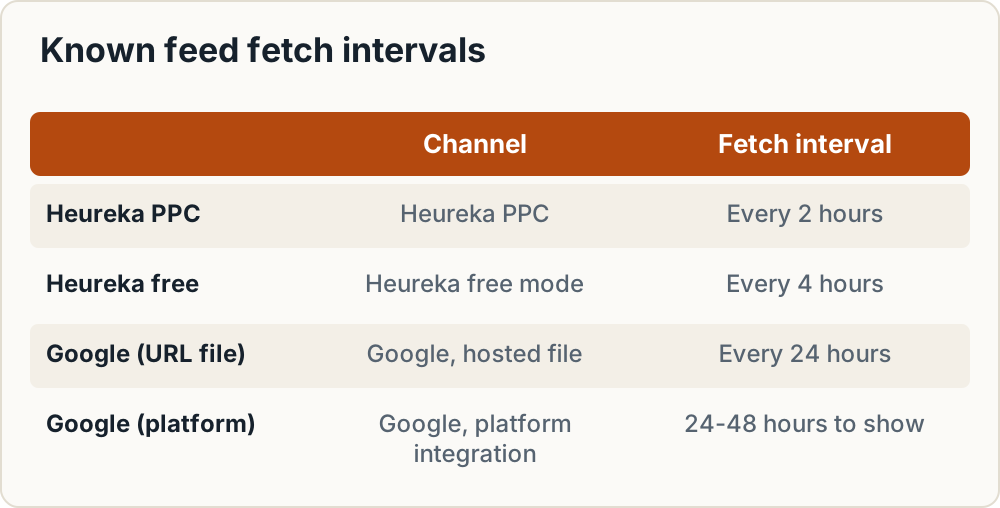
- Heureka: reads the feed every 2 hours in PPC mode and every 4 hours in free mode (Heureka).
- Google: a file hosted at a URL is fetched every 24 hours. Changes made through e-commerce platform integrations may take 24–48 hours to show (Google update frequency).
- Zboží.cz and Árukereső/Compari: we couldn't confirm the refresh frequency in their public documentation. Check the portal admin.
The practical rule is to regenerate the feed file at least as often as the shortest fetch interval of any channel you use. On Heureka PPC, that means every 2 hours or more often. For stock that changes fast, regenerate hourly. Daily is the minimum for any shop. Drop sold-out products from comparison feeds, or mark them correctly, rather than letting a stale "in stock" flag send paid clicks to an empty page.
Step 7: Choose platform export, plugin or feed tool
| Situation | Platform export or plugin | Feed tool or middleware |
|---|---|---|
| Number of channels | 1–2 | 3 or more |
| SKU count | Small catalogue, few variants | Hundreds to thousands of variants |
| Per-channel title or category rules | Not needed; data already fits | Needed (title templates, exclusions, category mapping per channel) |
| Allegro or eMAG sync | No | Yes; an integrator such as BaseLinker is the usual route for Allegro |
| Stock changes | Rare | Frequent, several times a day |
| Who maintains it | Owner, occasionally | Someone who reviews rules and diagnostics each week |
A platform export or plugin is usually enough when you're on one or two channels, the data is clean and your categories already map well. Shoptet has native comparison feeds, and WooCommerce has several feed plugins. A dedicated feed tool or middleware starts to pay off with three or more channels, per-channel rules, marketplace sync or very volatile stock. We don't quote prices here because they change. Compare current plans against the number of products and channels you'll actually run. For a WooCommerce example, see WooCommerce Czech Republic setup including feeds.
No tool fixes bad master data. A missing GTIN or a wrong delivery date passes straight through any tool. Do Steps 1–5 first.
Step 8: Run a weekly and monthly routine
Weekly:
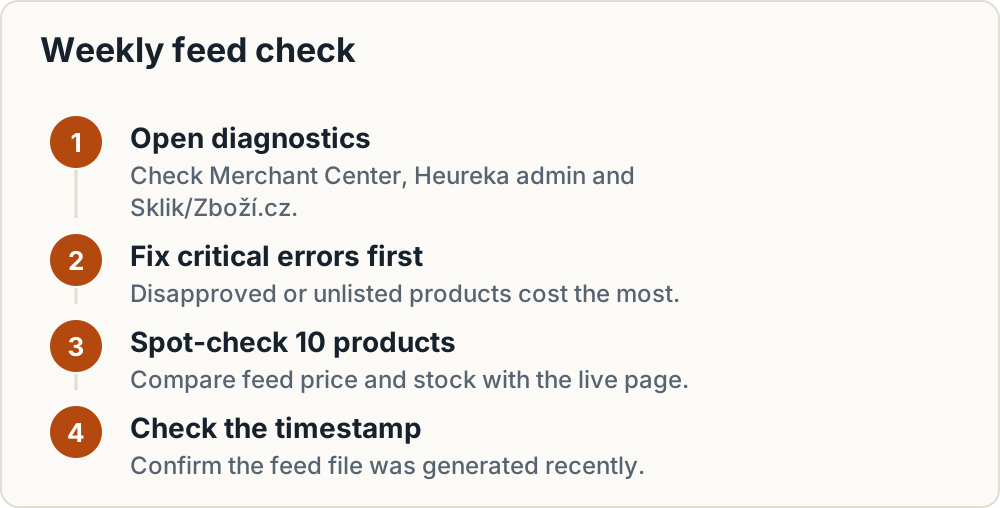
- Open diagnostics in Merchant Center, the Heureka admin and Sklik/Zboží.cz.
- Fix critical errors first. Disapproved or unlisted products cost the most.
- Pick 10 random products and compare feed price and stock against the live page.
- Check that the feed file's last-generated timestamp is recent.
Monthly:
- Check new products for missing GTIN, brand and category mapping.
- Remove discontinued items and redirect or retire their URLs.
- Compare clicks or conversions for products with old and new title patterns. Adjust the template, not individual titles.
- Re-read each channel's spec page for changes.
After any shop change (new theme, plugin update, URL structure change, VAT rate change, currency change): regenerate the feed and test a few items in each channel's validator before the next scheduled fetch.
Common mistakes
- Identical titles for variants. Five sizes with the same title disappear from Zboží.cz. Add the size or colour.
- IDs that change. A plugin switch that changes IDs from SKU to post ID makes every product look new to every channel.
- Feed price that doesn't match the page. This happens with VAT changes, currency rounding or discounts applied only in the cart.
- Guessed GTINs. A blank field does less damage than a wrong code.
- Promo text in titles. "Free shipping", "SALE" and store names break Google, Heureka and FAVI rules.
- Diacritics or spaces in URLs. Heureka and Árukereső/Compari require clean URLs, and Árukereső/Compari also require HTTPS (FAVI).
- Over-general categories. "Home" or "Other" gets products rejected or listed badly.
- HTML, advertising copy or phone numbers in descriptions. Zboží.cz expects plain, relevant text.
- A feed that updates less often than the channel fetches it, so paid clicks land on sold-out products.
Where to go next
- Full element lists: Heureka, Zboží.cz, Árukereső and Compari feed requirements
- Marketplaces: selling on Allegro from another EU country and selling on eMAG as a foreign seller
- Product safety data marketplaces ask for: GPSR fields on Allegro, Kaufland and eMAG
- Shop setup: WooCommerce Czech Republic setup including feeds
Frequently asked questions
Can I use one feed file for Google, Heureka and Zboží.cz?
Usually not as a single file, because the channels use different tag names, and Zboží.cz needs its own XML namespace. You can use one master dataset and generate one file per channel from it. The underlying values stay identical; only the field names and formatting change.
Can I upload an XML feed directly to Allegro?
Not on Allegro.cz. It doesn't accept a direct XML feed. Shops list through a Shoptet or Heureka v2 feed, usually via an integrator such as BaseLinker. CSV/XML imports are one-off, and ongoing price and stock sync needs one of the supported feed formats.
Do I need GTINs for every product?
No. Send a GTIN only when the manufacturer has assigned one and you have verified it. For handmade or private-label products without a barcode, Google expects brand plus MPN instead. Inventing or copying a code risks disapproval or a wrong catalogue match.
What image size should a feed use?
Requirements differ by channel. Google sets a 500x500 px minimum, enforced from 31 January 2027. FAVI sets 600x600 px and recommends 1000x1000 px with no text, watermarks or logos. A clean 1000x1000 px JPEG or PNG on a plain background is a safe default for the channels in this guide. Still check each channel's current minimum.
Should out-of-stock products stay in the feed?
On comparison engines that charge per click, sold-out items mostly waste budget, so exclude them or mark them with an accurate availability value. Google needs the availability attribute to reflect the real status. Whatever you choose, the feed has to match the product page at the moment the channel fetches it.
Copyable data quality checklist
PRODUCT FEED QUALITY CHECKLIST

Identity
[ ] Every item has a unique, permanent ID (max 36 chars: a-z, A-Z without diacritics, 0-9, - and _)
[ ] No duplicate IDs in any feed
[ ] No duplicate titles (variants include size/colour/model)

Content
[ ] Title = Brand + line + type + key attribute; key info in first 70 chars
[ ] Title matches landing page title; no promo text, store name or ALL CAPS
[ ] Description is plain text, no HTML, no phone/email, no promo text
[ ] Brand/manufacturer filled for every product that has one

Identifiers
[ ] GTIN/EAN is 8, 12, 13 or 14 digits, no spaces
[ ] Every GTIN passes check digit validation, or the field is blank
[ ] Private-label items have brand + MPN instead of a GTIN

URLs and images
[ ] Feed URL, product URLs and image URLs are HTTPS
[ ] No spaces or diacritics in any URL
[ ] Product URL opens a page showing price and add-to-cart
[ ] Main image ~1000x1000 px, clean photo, no text/watermark/logo

Price and stock
[ ] Feed price = landing page price incl. VAT
[ ] Currency correct (ISO 4217 for Google; CZK for CZ engines)
[ ] Max two decimals in PRICE_VAT
[ ] DELIVERY_DATE / availability matches the real shop promise
[ ] Sold-out items excluded or correctly marked

Structure
[ ] File is UTF-8
[ ] Zboží.cz feed uses namespace http://www.zbozi.cz/ns/offer/1.0
[ ] Every shop category mapped to Heureka, Zboží.cz, Google and Árukereső/Compari
[ ] Feed regenerates at least as often as the fastest channel fetch

Routine
[ ] Weekly: diagnostics in Merchant Center, Heureka, Sklik/Zboží.cz; spot-check 10 items
[ ] Monthly: new products complete; discontinued removed; title template reviewed
[ ] After theme/plugin/URL/VAT change: regenerate and re-test
Sources
What this guide relies on, in the order cited.
- BaseLinker · base.com
- Heureka XML specification · sluzby.heureka.cz
- Google product data specification · support.google.com
- Sklik · napoveda.sklik.cz
- FAVI notes on Árukereső/Compari/Pazaruvaj · help.favionline.com
- Sklik diagnostics · napoveda.sklik.cz
- Google GTIN help · support.google.com
- FAVI elements · help.favionline.com
- Google update frequency · support.google.com