
On this page
- BLIK in 60 seconds: what the customer does
- The four things that decide your provider
- Can a non-Polish company accept BLIK?
- Decision table: which provider for which seller
- BLIK fees compared on a 200 PLN order
- Payout timing: when the money arrives
- Disputes and refunds on BLIK
- Setup on Shopify
- Setup on WooCommerce
- What is BLIK Level 0 and does a shop need it?
- Scenarios and recommendations
- Frequently asked questions
- Next steps: BLIK launch checklist
If you sell from outside Poland and have no Polish company, the realistic options for BLIK are Stripe or Shopify Payments. If you have a Polish company and a Polish bank account, Przelewy24, PayU and Tpay usually charge less per order. This guide covers BLIK webshop setup step by step: who can use each provider, what a 200 PLN order costs with each one, when the money arrives, and what to configure on Shopify and WooCommerce.
The guide sticks to BLIK. For card fees and Czech rates, see Payment Gateway Fees in Poland and Czechia (2026).
BLIK in 60 seconds: what the customer does
BLIK is a single-use mobile payment that the customer has to authenticate. According to Stripe's BLIK documentation, it works like this:
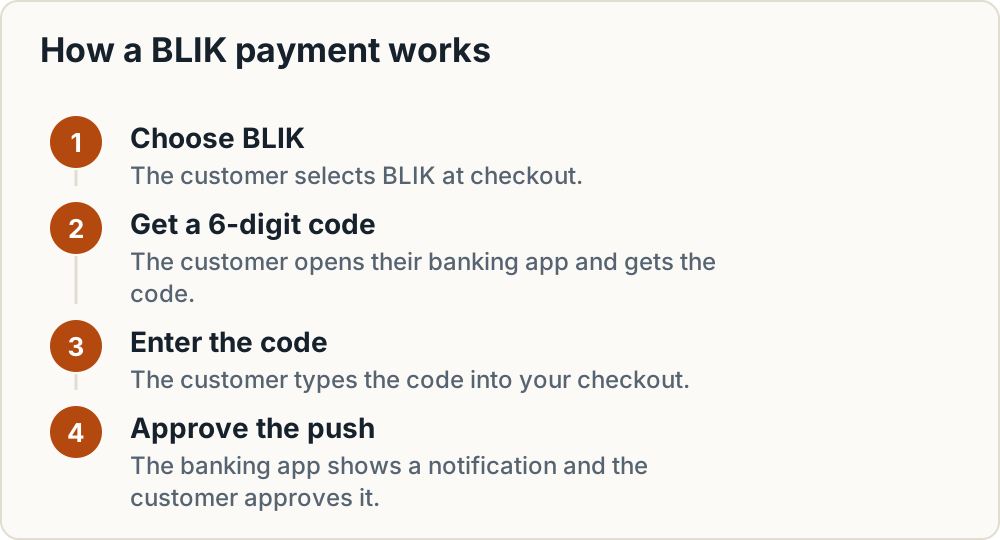
- The customer chooses BLIK at checkout.
- The customer opens their banking app and gets a 6-digit code.
- The customer types the code into your checkout.
- The banking app shows a push notification, and the customer approves it.
The code is valid for 2 minutes. Once the payment starts, the customer has 60 seconds to authorise it. Most approvals take less than 10 seconds.
For a shop, this matters in two ways. The customer's bank confirms the payment inside its own app, so you never handle card data. And the checkout must charge PLN to a customer in Poland. BLIK is one part of the Polish payment mix. For the full picture, see payment methods to offer in Poland, Czechia and CEE.
The four things that decide your provider
- Where your company is registered. This decides which providers will onboard you at all.
- The currency you get paid in. If your payouts are in CZK, EUR, HUF or RON, Stripe adds a conversion surcharge.
- Monthly BLIK volume. Flat monthly fees only pay off above a certain number of orders.
- Your shop platform. Shopify Payments offers BLIK as a built-in option. WooCommerce needs a plugin.
Can a non-Polish company accept BLIK?
Stripe: yes. Stripe accounts in 36 countries can accept BLIK: AT, AU, BE, BG, CA, CH, CY, CZ, DE, DK, EE, ES, FI, FR, GB, GR, HR, HU, IE, IS, IT, LI, LT, LU, LV, MT, NL, NO, PL, PT, RO, SE, SG, SI, SK and US. The customer must be in Poland, and the payment must be shown and charged in PLN (Stripe docs).
Shopify Payments: yes, in listed countries only. Shopify's BLIK page lists eligible countries including Poland, Czechia, Hungary, Romania, Germany and France. Slovakia, the UK and the US are not on the list, so a Slovak Shopify store cannot use this route and should look at Stripe instead. Your store currency must be PLN, or you need a Poland market priced in PLN. Customers must have a Polish address, pay in PLN and use a supported Polish bank (Shopify Help Center).
Przelewy24, PayU, Tpay: unconfirmed. All three onboard merchants with a Polish company in mind. PayU's commercial offer page asks for company registration documents and the PESEL numbers (Polish personal ID numbers) of your representatives, and it says nothing about foreign companies. Przelewy24 does pay out to foreign bank accounts and offers EUR SEPA payouts (P24 fees), so non-Polish bank accounts are supported. We found no published rule saying whether any of the three onboards a foreign company. Ask their sales teams directly, and get the answer in writing.
Decision table: which provider for which seller
Fees as published on each provider's own page, checked 29 October 2026.
| Provider | Realistic without a Polish company? | BLIK fee per transaction | Fixed costs | Code entry on your own checkout | Best for |
|---|---|---|---|---|---|
| Stripe (pricing) | Yes, 36 account countries | 1.6% + 1.00 PLN; +2% if currency conversion is needed | None listed for BLIK | Inside Stripe's own payment form | Foreign sellers on WooCommerce or a custom stack; Slovak, UK and US Shopify stores |
| Shopify Payments (help) | Yes, in listed countries (incl. CZ, HU, RO, DE; not SK, UK, US) | Not on the BLIK help page; check the rates in your Shopify admin | Your Shopify plan | Inside Shopify checkout | Shopify stores in an eligible country |
| Przelewy24 (fees) | Unconfirmed, ask P24 | 1.29% + 0.30 PLN | 59 PLN activation (refunded after 10 transactions in the first 2 months); 0 PLN monthly; 4 free PL payouts a month, then 0.99 PLN; foreign payout 40 PLN; EUR SEPA 1.5 EUR | Depends on the integration | Polish companies up to roughly 110 orders a month |
| PayU (offer) | Unconfirmed; onboarding asks for PESEL | 1.1% + 0.32 PLN currently shown (standard rate 1.49%); confirm with PayU | 29 PLN activation (previously 199 PLN) | Depends on the integration | Polish companies that get the 1.1% rate in their contract |
| Tpay (offer) | Unconfirmed, ask Tpay | Starter 1.59% + 0.41 PLN; Business 0.99% + 0.02 PLN | Starter: 99 PLN activation, 2 PLN per payout. Business: 1 PLN activation, 99 PLN a month, free payouts to Polish accounts | Yes, "BLIK LVL 0" toggle in the WooCommerce plugin | Polish companies; Business beats P24 from about 113 orders a month at 200 PLN |
Rule of thumb: with no Polish company, start with Stripe or Shopify Payments. With a Polish company and a Polish bank account, compare Przelewy24, PayU and Tpay at your own volume.
BLIK fees compared on a 200 PLN order
The figures below use the published rates above. Percentages are the effective rate on the basket.
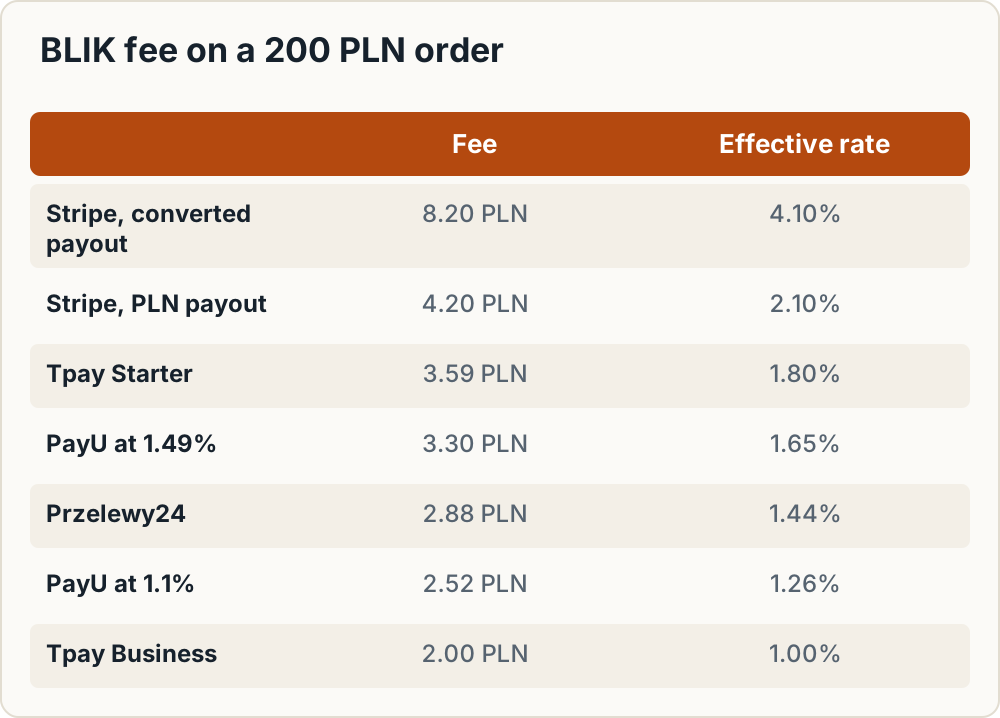
| Provider / plan | Calculation | Fee | Effective rate |
|---|---|---|---|
| Stripe, payout in PLN | 3.20 + 1.00 | 4.20 PLN | 2.10% |
| Stripe, payout converted to CZK/EUR/RON | 3.20 + 1.00 + 4.00 | 8.20 PLN | 4.10% |
| Przelewy24 | 2.58 + 0.30 | 2.88 PLN | 1.44% |
| Tpay Starter | 3.18 + 0.41 | 3.59 PLN | 1.80% |
| Tpay Business (plus 99 PLN a month) | 1.98 + 0.02 | 2.00 PLN | 1.00% |
| PayU at 1.1% | 2.20 + 0.32 | 2.52 PLN | 1.26% |
| PayU at standard 1.49% | 2.98 + 0.32 | 3.30 PLN | 1.65% |
Warning: For a seller outside Poland, Stripe's headline BLIK rate is not the full cost. BLIK is always charged in PLN. If your Stripe balance pays out in CZK, EUR, HUF or RON, the 2% conversion surcharge on Stripe's Polish pricing page roughly doubles the fee on a 200 PLN order. Find out which currency your account settles in before you launch.
A month at 100 orders of 200 PLN
- Stripe with conversion: 820 PLN. Without conversion: 420 PLN.
- Tpay Starter: 359 PLN, plus 2 PLN for each payout.
- Tpay Business: 200 PLN + 99 PLN = 299 PLN.
- Przelewy24: 288 PLN. Four Polish payouts a month are free.
- PayU at 1.1%: 252 PLN, if that rate applies to you. At the standard 1.49%: 330 PLN.
One-off activation fees come on top: 59 PLN at P24 (refundable), 99 PLN or 1 PLN at Tpay, and 29 PLN at PayU.
Break-even formulas for monthly fees
Tpay Starter vs Business. Per order, Business saves (1.59% − 0.99%) × basket + (0.41 − 0.02) PLN. That simplifies to 0.006 × basket + 0.39 PLN.
- 200 PLN basket: 1.20 + 0.39 = 1.59 PLN saved per order. 99 / 1.59 ≈ 62.3, so Business beats Starter from 63 orders a month.
- 100 PLN basket: 0.60 + 0.39 = 0.99 PLN saved. Break-even is 100 orders a month.
Starter's 2 PLN payout fee lowers this break-even slightly if you withdraw often.
Przelewy24 vs Tpay Business. Per order, Business saves (1.29% − 0.99%) × basket + (0.30 − 0.02) PLN, which is 0.003 × basket + 0.28 PLN. On a 200 PLN basket that is 0.88 PLN, so 99 / 0.88 ≈ 112.5 and Business only beats P24 from 113 orders a month. Below that, P24 is cheaper.
To rerun either comparison, divide 99 by your own per-order saving.
Payout timing: when the money arrives
| Provider | Published payout timing |
|---|---|
| Stripe | Standard timing for BLIK. In Poland and EU countries, the first settlement takes 7 calendar days and the default after that is 3 business days. The first payout usually lands 7–14 days after your first live payment, depending on industry, country and risk. You can choose daily, weekly, monthly or manual payouts (Stripe payouts). |
| Shopify Payments | BLIK funds are captured automatically and included in your next payout (Shopify Help). |
| Przelewy24 | Funds are paid out according to the schedule you set in the panel under PAYOUTS > Order payout, either amount-based or date-based (P24 help). The help page gives no exact number of days, so confirm it in your contract. |
| PayU | Not published on the commercial offer page. Check your contract. |
| Tpay | Not published on the offer page. Check your contract. |
Holds and rolling reserves can delay payouts beyond these schedules. See payouts, disputes and reserves for small CEE shops.
Disputes and refunds on BLIK
BLIK has its own claims process. A customer can file a claim for suspected fraud, a double payment, or a wrong amount. On Stripe, the disputed amount is held until BLIK decides the case. You have 12 calendar days to submit evidence, and if you lose, the debit is final (Stripe docs). Shopify Payments allows BLIK disputes up to 13 months after the transaction and handles refunds the same way as card refunds.
Stripe supports full and partial BLIK refunds. Depending on the bank, they go through immediately or within a couple of hours. For each order, keep:
- the tracking ID and shipping date
- the order record
- any refund record
For the returns side, see cross-border returns for CEE e-commerce.
Setup on Shopify
Shopify Payments
- Add Poland as a market priced in PLN, or set your store currency to PLN. Check your PLN price rounding and how prices display.
- Go to Settings > Payments > Shopify Payments > Manage.
- Open More actions > Manage payment methods > Local payment methods.
- Select BLIK and enable it.
There are some limits. BLIK on Shopify Payments doesn't work for subscription orders, doesn't support manual capture, and only shows to customers with a Polish address paying in PLN (Shopify Help). Older forum threads, mostly from 2020–2022, say BLIK isn't possible on Shopify. They are out of date: the current help page documents the feature.
Polish gateway apps
Tpay, PayU and Przelewy24 publish Shopify apps, but they are designed for merchants registered in Poland. Fee lists for these apps on third-party blogs are often old, so rely on the providers' own price pages linked above. For the Czech and Slovak side of a Shopify store, see Shopify setup for Czech and Slovak shops.
Setup on WooCommerce
Stripe
- In the Stripe Dashboard, enable BLIK under your payment methods.
- In WooCommerce, open the Stripe extension's payment method settings and check that BLIK is selected. Menu labels vary between plugin versions, so follow the extension's own documentation.
- Make sure the cart is priced in PLN. Otherwise BLIK won't appear.
- Don't rely on express payment buttons for BLIK. Stripe's Express Checkout Element does not support it.
Tpay
The Tpay WooCommerce plugin requires WordPress with PHP 7.0 or later, WooCommerce, a store priced in PLN, and an active Tpay account.
- Download the plugin from Tpay's official GitHub repository (linked in its documentation) and upload it under Plugins > Add New > Upload Plugin.
- Under WooCommerce > Tpay Settings, enter your Security Code, Client ID and API Secret from the Tpay merchant panel.
- Enable the payment methods you want.
- Switch "BLIK LVL 0" on so customers enter the code on your page. If you switch it off, customers are redirected to eBLIK.
PayU and Przelewy24
Both offer WooCommerce plugins. Install them from the providers' own documentation, and check first that their onboarding accepts your company. For more Polish add-ons, see WooCommerce plugins for Poland. For the Czech and Slovak side, see WooCommerce setup for CZ and SK.
What is BLIK Level 0 and does a shop need it?
With Level 0, the customer types the 6-digit code into your own checkout and isn't redirected anywhere. With standard BLIK, the customer is redirected to the gateway's page.
Building Level 0 yourself takes real development work. On Tpay, you send a transaction with groupId 150 and the code as blikToken. You must also send the payer's email, name, IP address and user agent, show a waiting screen, and handle webhooks to get the result (Tpay API docs).
A small shop doesn't need to build this. Stripe and Shopify Payments already collect the code inside their own payment forms, and Tpay's plugin has a toggle for it. BLIK also offers Level 0 OneClick, where logged-in customers pay without entering a code. BLIK recommends it for shops with a high daily transaction volume, many returning customers, and the resources to implement and maintain it. Consider OneClick, or Stripe's reusable BLIK, only for subscriptions or frequent repeat purchases.
Scenarios and recommendations
| Scenario | Recommendation | Expected BLIK cost per 200 PLN order |
|---|---|---|
| Czech Shopify shop, no Polish company, about 40 PL orders a month | Shopify Payments with a Poland market in PLN | Your Shopify Payments rate; check it in your admin |
| Slovak Shopify or WooCommerce shop, or Romanian WooCommerce shop, payouts in EUR or RON | Stripe; ask whether your account can settle in PLN | 8.20 PLN with conversion, 4.20 PLN without |
| Polish company, under about 110 orders a month | Przelewy24, or PayU if the 1.1% rate is in your contract | 2.88 PLN, or 2.52 PLN |
| Polish company, over about 113 orders a month at about 200 PLN | Compare Tpay Business with PayU's contracted rate | 2.00 PLN + 99 PLN a month, or 2.52–3.30 PLN |
Frequently asked questions
Can customers pay with BLIK in euro or Czech crowns?
No, not on Stripe or Shopify Payments. Both require the order to be in PLN and the customer to be in Poland. A shop that only prices in EUR or CZK won't show BLIK at all.
Do I need a Polish bank account to receive BLIK payments?
Not with Stripe or Shopify Payments, which pay out to your usual account. With Stripe, though, a non-PLN payout can trigger the 2% conversion surcharge. Przelewy24 pays out to foreign accounts for 40 PLN per payout, or by EUR SEPA for 1.5 EUR.
Can BLIK be used for subscriptions?
Not through Shopify Payments, which excludes subscription orders from BLIK. Stripe offers reusable (off-session) BLIK with its own eligibility rules. BLIK's OneClick model is aimed at shops with many returning customers.
Do BLIK refunds cost anything?
Przelewy24 lists refunds at 0 PLN. On Stripe, BLIK refunds can be full or partial and are processed immediately or within a couple of hours. Shopify Payments handles them like card refunds. Check your contract to see whether the original transaction fee is returned.
Does BLIK work with Stripe's express checkout buttons?
No. Stripe's Express Checkout Element doesn't support BLIK, so it has to appear as a payment method in your main checkout form.
Next steps: BLIK launch checklist
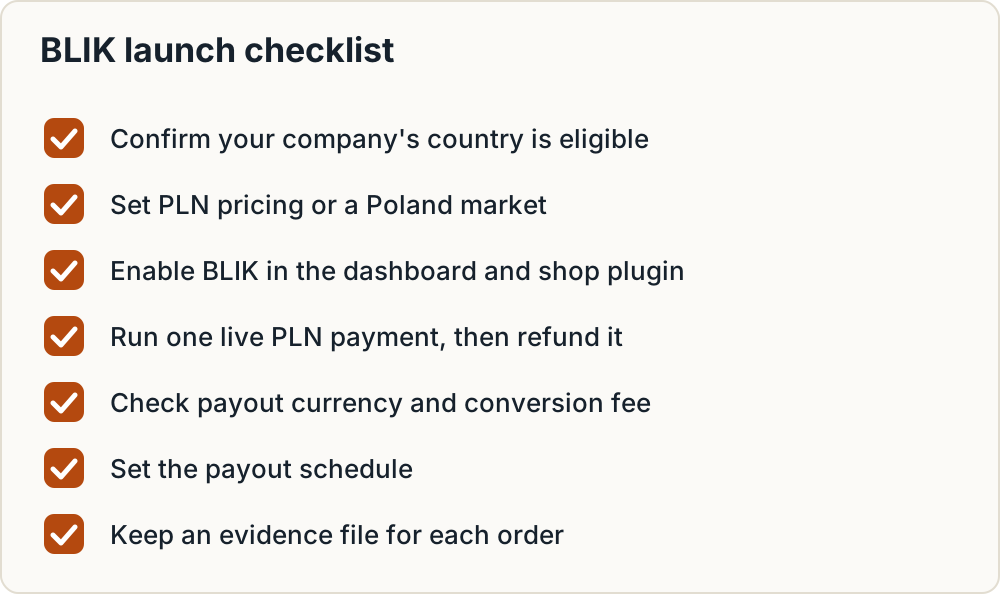
- Confirm your company's country is on the provider's eligible list (Stripe: 36 countries; Shopify Payments: check the BLIK help page, Slovakia is not listed).
- Set PLN pricing or a Poland market, and check PLN price rounding.
- Enable BLIK in the provider dashboard and in the shop plugin or settings.
- Run one real live payment in PLN, then refund it.
- Check which currency you are paid out in and whether a conversion fee applies.
- Set the payout schedule.
- Set up an evidence file for each order: tracking ID, shipping date, order and refund records.
- Use "BLIK" as the method label in the Polish checkout text.
- Publish Polish delivery and returns terms, and offer Polish carriers. See carriers for small CEE shops.
- Check whether you need to register packaging in Poland. See BDO registration for foreign online sellers.
If you're also choosing a shop platform, compare how each one handles Polish methods in Shoptet vs Shopify vs WooCommerce for CEE payments before you sign a gateway contract.
Sources
What this guide relies on, in the order cited.
- Stripe's BLIK documentation · docs.stripe.com
- Shopify Help Center · help.shopify.com
- PayU's commercial offer page · poland.payu.com
- P24 fees · przelewy24.pl
- pricing · stripe.com
- offer · tpay.com
- Stripe payouts · docs.stripe.com
- P24 help · przelewy24.pl
- Tpay WooCommerce plugin · docs-api.tpay.com
- Tpay API docs · docs-api.tpay.com
- Level 0 OneClick · blik.com