On this page
- Kaufland Global Marketplace in CZ, SK and PL: what you are signing up for
- Fees: subscription, commission by category, extras
- Worked example: what a sale really costs
- Registration and verification
- Go-live checklist for Kaufland.cz, .sk and .pl
- Listing requirements and product data
- Which storefront first? Decision table
- Common mistakes
- Frequently asked questions
- Next steps
This guide explains how the rules work in practice. It is not legal or tax advice; check the linked official sources or ask an adviser for your specific case.
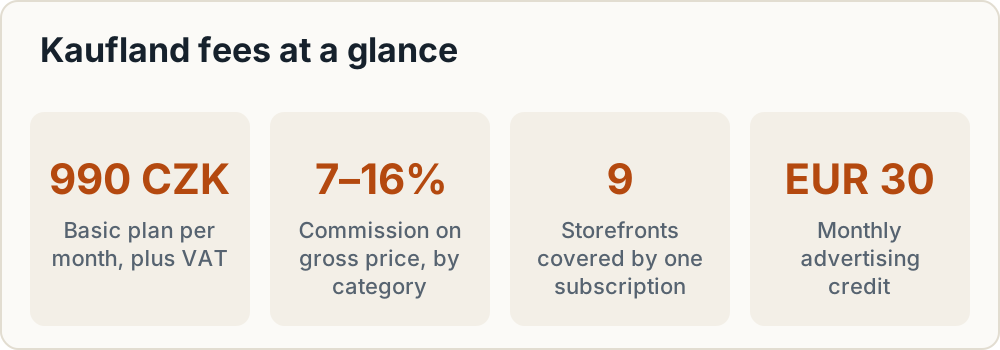
If you want to sell on Kaufland marketplace in the Czech Republic or Slovakia, you pay a monthly subscription from 990 CZK plus VAT, and commission of 7–16% depending on category. That commission is charged on the gross price, including VAT and delivery. The same account and subscription also open Kaufland.pl, where commissions are lower in most categories (4–12%). For most small CEE shops the question is not whether the fees are acceptable. It is which storefront to open first, and whether your prices still work once commission is taken from the gross amount.
This guide covers the fees, a worked margin example, registration, an 8-step go-live checklist and a decision table for choosing a first storefront.
Kaufland Global Marketplace in CZ, SK and PL: what you are signing up for
Kaufland runs one seller platform, Kaufland Global Marketplace, with nine storefronts: Germany, France, Italy, Spain, the Netherlands, Poland, Austria, the Czech Republic and Slovakia. One subscription covers all nine. You pick a primary storefront after activation, and you can add more sales channels at any time free of charge in the Seller Portal.
The CEE storefronts are fairly new. Kaufland.sk went live on 15 February 2023, and Kaufland.cz followed on 12 April 2023. Poland was added later.
Kaufland's basic requirements are:
- You sell as a trader (a business, not a private person) and can be reached easily by phone and email.
- You do not sell products from prohibited categories.
- Every item has an official EAN (GTIN).
- You talk to customers in the national language of each storefront.
- Your returns address is inside the EU.
Who it suits: EU-based shops that already ship within the EU and can handle returns and support in Czech, Slovak or Polish. Who it does not suit: sellers without GTINs for their own-brand goods, and sellers who cannot run returns from an EU address.
Fees: subscription, commission by category, extras
The figures below come from Kaufland's conditions page and its commission table, checked in October 2026. Rates change, so confirm your category in the Seller Portal before you set prices.
Monthly subscription
| Plan | EUR | CZK | PLN | Included |
|---|---|---|---|---|
| Basic | 39.95 | 990 | 175 | All 9 storefronts, EUR 30 monthly advertising credit |
| Plus | 59.95 | 1,500 | 260 | All 9 storefronts, EUR 30 monthly advertising credit |
All prices are per month plus VAT (source). The advertising credit is for Sponsored Product Ads. You pay one fee, not one per country. Plans can be cancelled at any time, and a downgrade needs four weeks' notice.
Commission by category: CZ/SK vs PL
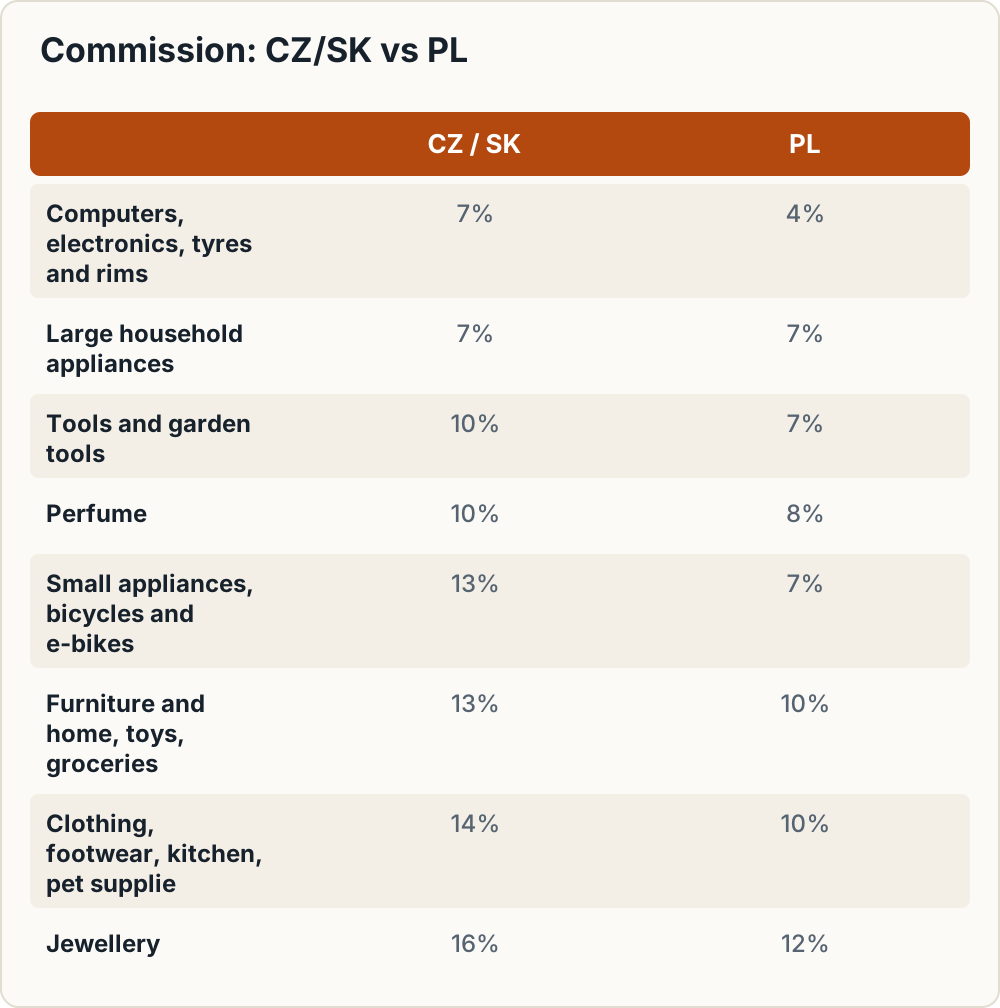
The Czech and Slovak storefronts use the same rates as DE, AT, FR, IT, ES and NL. Poland has its own, lower table.
| Category | CZ / SK | PL |
|---|---|---|
| Computers, consumer electronics, robot vacuums, tyres and rims | 7% | 4% |
| Large household appliances | 7% | 7% |
| Tools and garden tools | 10% | 7% |
| Perfume | 10% | 8% |
| Small household appliances, computer accessories, bicycles and e-bikes | 13% | 7% |
| Personal care and health, cars and motorbikes | 13% | 8% |
| DIY | 13% | 9% |
| Furniture and home, lamps, sport and outdoor, baby products, toys, groceries | 13% | 10% |
| Media | 13% + EUR 0.70/item | 9% + EUR 0.70/item |
| Garden | 14% | 9% |
| Mattresses, kitchen and household, clothing, footwear, pet supplies | 14% | 10% |
| Jewellery | 16% | 12% |
| All other categories | 13% | 10% |
Source: Kaufland commission table and conditions page.
The conditions page also lists bags and accessories, camping, fitness and SUP at 14%. Some third-party summaries still show 13% for a few of these categories. We use Kaufland's official 14%. "Furniture and home" (13%) and "kitchen and household" (14%) are easy to confuse, so check where your exact product type sits in the live table.
Commission base. Kaufland charges commission on the gross sales price, including VAT and the delivery charge paid by the buyer. At 21% Czech VAT, a 13% rate works out at about 15.7% of your net revenue. Set prices on that basis, not on the headline percentage.
Other charges
From the conditions page:
- EPR service: EUR 1.90 per month per product category, plus statutory contributions. Kaufland applies it when you do not enter your own EPR numbers for a category.
- Vouchers: free to create. Each redemption costs EUR 0.49–0.99. On Kaufland.cz that is 12 CZK for products up to 2,500 CZK and 24 CZK above that. On Kaufland.pl it is 2 PLN for products up to 400 PLN and 4 PLN above that.
- Performance Coach: EUR 399 per month with a 6-month minimum. This is optional, and most small sellers can skip it at the start.
- Listings: listing an unlimited number of items is free.
Worked example: what a sale really costs
The prices and costs below are illustrative. The commission rates and subscription prices are Kaufland's.
Kaufland.cz, household item. The list price is 1,210 CZK including 21% VAT (1,000 CZK net). The buyer also pays 99 CZK for shipping (81.82 CZK net).
| Line | 13% category | 14% category |
|---|---|---|
| Gross commission base (1,210 + 99) | 1,309.00 CZK | 1,309.00 CZK |
| Commission | 170.17 CZK | 183.26 CZK |
| Net revenue (1,000 + 81.82) | 1,081.82 CZK | 1,081.82 CZK |
| Effective rate on net revenue | 15.7% | 16.9% |
Kaufland.pl, the same product at 10%. At an illustrative price of 246 PLN including 23% VAT (200 PLN net), plus 12.30 PLN shipping (10 PLN net), the commission base is 258.30 PLN. Commission is 25.83 PLN, an effective rate of 12.3% on 210 PLN net revenue.
Spreading the subscription. At 50 orders a month, the 990 CZK Basic fee adds 19.80 CZK per order. The EUR 30 advertising credit offsets part of that, but only if you would have spent on ads anyway.
Breakeven for the fixed fee. Assume the item costs you 550 CZK net and shipping costs you 90 CZK net. Using the 13% case, the contribution per order is:
1,081.82 − 170.17 − 550 − 90 = 271.65 CZK
For the 990 CZK fee to fall below 5% of your monthly contribution, you need:
990 ÷ (0.05 × 271.65) = 990 ÷ 13.58 = 72.9, so 73 orders a month.
On the Plus plan, the same calculation (1,500 ÷ 13.58) gives 111 orders. Below those volumes the subscription takes a large share of your margin, so count it as a real cost while you test the channel. Your Kaufland invoices show how VAT on the fees is handled for your business.
Registration and verification
Kaufland's registration has nine steps. Collect the documents before you start.
- Start registration at kaufland.com/join.
- Account details.
- General information: a pseudonym for your seller presence, the average number of items you will offer, and your main categories.
- Company details, including tax details. Here you also enter beneficial owners: everyone holding 25% or more, with name, date of birth, address and shareholding (requirements).
- Upload documents: ID, business registration and commercial register excerpt. Each file can be up to 4 MB, and the register extract must be no older than four weeks.
- Contact person for Kaufland's customer service. If your products need CE marking, you also name an authorised representative.
- Review your information.
- Activation: within three working days if your data is complete.
- Select your primary storefront through the link in the activation email.
EU sellers need to provide a VAT ID and an OSS number for each sales channel. Non-EU sellers need tax registrations in each country, an EU representative for CE-marked products and proof of DDP (delivered duty paid) import in the Seller Portal. For the VAT side, see our guide to OSS VAT registration steps for CZ and PL.
Go-live checklist for Kaufland.cz, .sk and .pl
Kaufland's onboarding guide lists eight steps. The country columns add our notes for CEE sellers.
| # | Step | CZ | SK | PL |
|---|---|---|---|---|
| 1 | Shipping groups (costs, types, destinations, transport times). Set these up before creating offers | Prices in CZK | Prices in EUR | Prices in PLN |
| 2 | Offers in the local language and currency | Czech, CZK | Slovak, EUR | Polish, PLN |
| 3 | Tax information: OSS number, if you are an EU seller and did not give it at registration | Kaufland asks for it | Same | Same |
| 4 | Legal notice, privacy policy, T&Cs and withdrawal information in the local language | Czech | Slovak | Polish |
| 5 | Company details and EPR numbers | Kaufland does not currently ask for EPR numbers | Kaufland does not currently ask for EPR numbers | BDO number |
| 6 | Returns address | Inside the EU | Inside the EU | Inside the EU |
| 7 | Warehouses: enter all you ship from; non-EU warehouses, including third-party fulfilment, must be declared | Same | Same | Same |
| 8 | Click "Publish now", or offers go live automatically within 24 hours |
Kaufland asks for WEEE, battery and LUCID numbers on Kaufland.de and a BDO number on Kaufland.pl. Even if Kaufland does not ask for an EPR number on .cz or .sk, national packaging and product EPR rules can still apply to you. See packaging EPR in Poland, Czechia and Slovakia.
Legal texts. Kaufland requires legal texts in the local language, so English-only texts are not enough for .cz, .sk or .pl. Prepare a translated legal notice, privacy policy and T&Cs for each storefront before you publish.
Listing requirements and product data
- EAN/GTIN on every offer. You cannot list without one. Own-brand sellers need to obtain their own GTINs before onboarding.
- Local language everywhere. Product data, legal texts and customer communication must be in the storefront's language. Kaufland's multilingual ticket system translates customer enquiries, which helps with support. It does not replace translated listings.
- Product safety data. Fill in the manufacturer and responsible-person fields. See GPSR fields on Kaufland.
- Prohibited categories. Check Kaufland's list of prohibited products before you upload a catalogue.
- Account security. Turn on two-factor authentication and set user rights for each staff member or agency that has access to the account.
Which storefront first? Decision table
| Kaufland.cz | Kaufland.sk | Kaufland.pl | |
|---|---|---|---|
| Commission level | Same as SK (7–16%) | Same as CZ (7–16%) | Lower in most categories (4–12%) |
| Currency | CZK | EUR | PLN |
| Kaufland compliance extra | Czech legal texts | Slovak legal texts | BDO number, Polish legal texts |
| Payments and COD | Check what buyers expect | Check what buyers expect | Check what buyers expect |
For payments, compare our notes on payment methods to offer in CEE and cash on delivery costs and refusal risk.
Recommendations by scenario:
- Czech shop, home or kitchen goods: start with Kaufland.cz, where your language, currency and returns setup already fit. Add .sk next. The rates are the same, but listings, legal texts and support still need Slovak translations.
- Slovak shop: start with .sk in EUR, then add .cz.
- Polish shop, or any seller of electronics, small appliances or personal care: Kaufland.pl's rates are 3–6 percentage points lower in these categories. Start there if you already hold a BDO number.
- Shop testing several channels: compare against selling on eMAG as a foreign seller before committing listings in another language.
Common mistakes
- Setting prices from net margin when commission is taken from the gross price plus delivery.
- Going live without an OSS number, or without the EPR numbers Kaufland requires for that storefront (BDO for Poland).
- Publishing with legal texts in English only.
- Using a returns address outside the EU.
- Uploading products without valid EANs, or with codes you do not own.
- Assuming a category is 13% when the live table shows 14%.
Frequently asked questions
How much does it cost to sell on Kaufland.cz and Kaufland.sk?
A Basic subscription costs 990 CZK (EUR 39.95) a month plus VAT, and Plus costs 1,500 CZK (EUR 59.95). On top of that you pay commission of 7–16% per sale depending on category. Optional extras include the EPR service and voucher redemption fees.
Is there a separate fee for each Kaufland country storefront?
No. One Basic or Plus subscription covers all nine storefronts, including Kaufland.cz, .sk and .pl. Commission is still charged on each sale at that storefront's own rates.
Is Kaufland commission charged on the price with or without VAT?
With VAT. Commission is calculated on the gross sales price, including delivery charges and VAT.
Can a Czech or Slovak company sell on Kaufland.pl with the same account?
Yes. You can add more sales channels free of charge in the Seller Portal. For Poland you need Polish listings, Polish legal texts and a BDO number, and your VAT setup must cover sales to Polish consumers.
How long does Kaufland seller account activation take?
Up to three working days, if your data is complete. After activation you choose your primary storefront. Your offers then go live when you click "Publish now", or automatically within 24 hours of completing onboarding.
Do I need an EAN code to list on Kaufland?
Yes. Every item needs an official EAN (GTIN).
Do I need to register for OSS to sell on Kaufland across countries?
Kaufland asks EU sellers for an OSS number, either at registration or during onboarding. OSS lets you declare B2C VAT for other EU countries in one return filed in your home country. Whether OSS or a local VAT registration fits your setup is a question for your tax adviser.
Where must the returns address be?
Inside the EU. This applies to all sellers, including those who ship from warehouses outside the EU.
Next steps
- Get a commercial register extract no older than four weeks, and scan your ID and business registration (max 4 MB each).
- Find each product's category in the live commission table, then rerun the worked example with your own prices and costs.
- Work out how many orders you need to cover the 990 CZK, EUR 39.95 or 175 PLN Basic fee.
- Choose your first storefront from the decision table above.
- Prepare translated legal texts, your OSS number (and BDO number for Poland), and an EU returns address.
- Register, allow up to three working days for activation, then work through the 8-step checklist and publish.
Sources
What this guide relies on, in the order cited.
- One subscription covers all nine · kauflandglobalmarketplace.com
- you can add more sales channels at any time free of charge · kauflandglobalmarketplace.com
- Kaufland.sk went live on 15 February 2023 · mediaguru.cz
- Kaufland.cz followed on 12 April 2023 · mediaguru.cz
- conditions page · kauflandglobalmarketplace.com
- commission table · kauflandglobalmarketplace.com
- onboarding guide · kauflandglobalmarketplace.com